
First of all, a small format change. Starting this month, the usual “Huge Docker Container Updates” becomes Self-Hosted NAS News. The name changes, but the spirit stays exactly the same: real, tested updates with no fluff, written for people who run Synology, UGREEN, and self-hosted containers at home on their NASes.
Portainer shipped the new LTS 2.45.0. This is the official jump from the previous 2.39.6 LTS. As always with Long Term Support releases, it is not a feature explosion every couple of weeks. Instead it consolidates everything that landed in the preceding STS versions, polishes it, and subjects it to heavier testing. Ideal if you want a solid Portainer and prefer stability over chasing every micro-release. The install and update guides on mariushosting are already aligned.
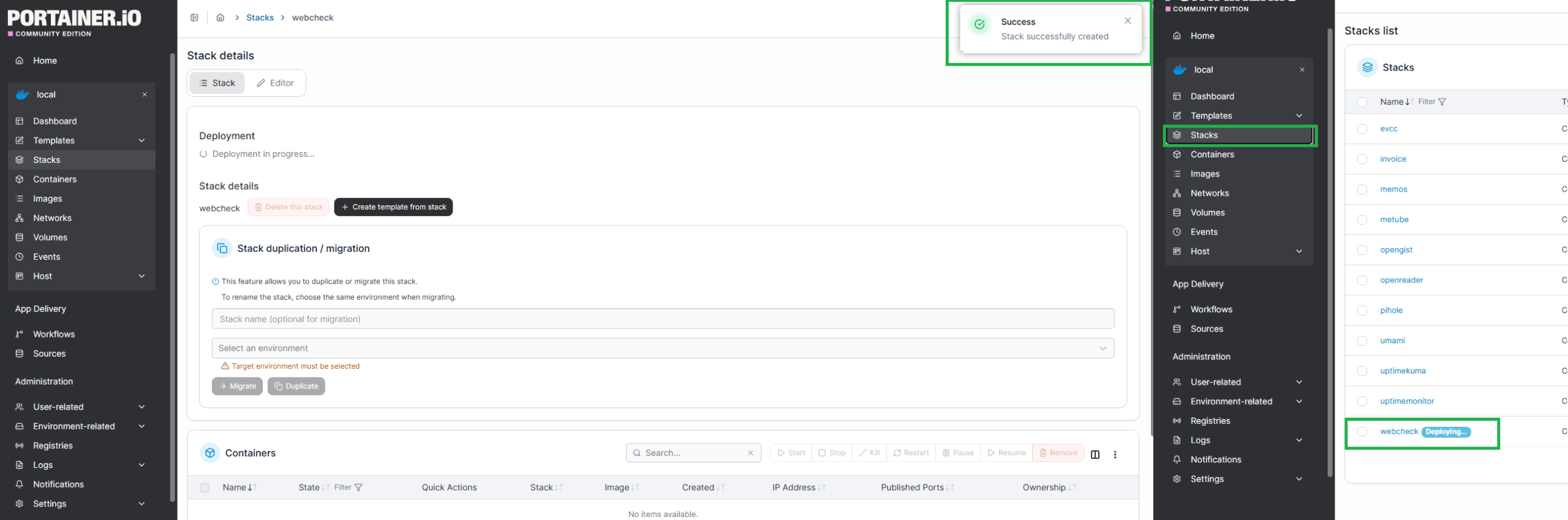
One practical change in Portainer 2.45.0 is how stack creation works. When you deploy any new stack you now get an immediate “Success Stack successfully created” message, even though the stack and its containers have not actually started yet. If you look at the Stacks page in the left sidebar, you will see the newly created stack still marked as Deploying…. The containers do not appear instantly. You have to wait until the deployment finishes. Any real errors (for example, if the stack fails to start) will also be shown on that same Stacks page. In my humble opinion, this is not ideal because, if you get an immediate “Success Stack successfully created” message, but the stack and containers has not actually started yet, this creates confusion as to whether it’s Successful or not. Anyway, I don’t find this change user friendly.
Meanwhile, Synology launched the DiskStation neo+ series (DS1825neo+, DS1525neo+, DS925neo+ and DS725neo+). On paper they look interesting because they lower the entry price. In reality they are underpowered right out of the box: they ship with only 4 GB of non-ECC RAM (versus 8 GB ECC on the regular Plus models). Same CPU (Ryzen V1500B or R1600 on the two-bay), same 2.5GbE ports and M.2 slots, but the base memory is simply too low for anyone doing serious self-hosting or running multiple containers, Paperless-ngx, Immich, indexing, Surveillance Station or even just several DSM packages at once. You can upgrade to 32 GB and switch to ECC later, but then most of the price advantage disappears. These are not the right solution if you need a NAS that can handle real Docker workloads and modern services without immediately opening the memory slots. Better stick with the classic Plus models or look at more balanced alternatives.

And speaking of Synology, another long-standing frustration remains completely unresolved: they still refuse to upgrade the Docker Engine in Container Manager. We are stuck on Docker engine 24.0.2, a version that reached End of Life years ago. Security fixes, performance improvements, newer Compose features, better networking, rootless support and countless bug fixes are simply not arriving. Month after month the rest of the container world moves forward while Synology keeps shipping the same ancient engine with only minor package-version bumps. It is genuinely frustrating for anyone who relies on Docker every day.
Paperless-ngx reached version 3.1.0. A welcome incremental update after the big 3.0 jump in July: improvements to AI workflows, selective use of remote OCR engines, merging documents as versions, assorted UI polish and a handful of stability and performance fixes. One practical detail is important. In the Paperless-ngx docker-compose, the Apache Tika image has been pinned:
image: docker.io/apache/tika:3.3.1.0 Many people were previously using image: docker.io/apache/tika:latest Tika version 4 is not currently supported by Paperless-ngx, so leaving :latest can break Office-document parsing. Update your compose and set the image explicitly to 3.3.1.0. The guides on mariushosting have already been corrected for Synology NAS and UGREEN NAS.
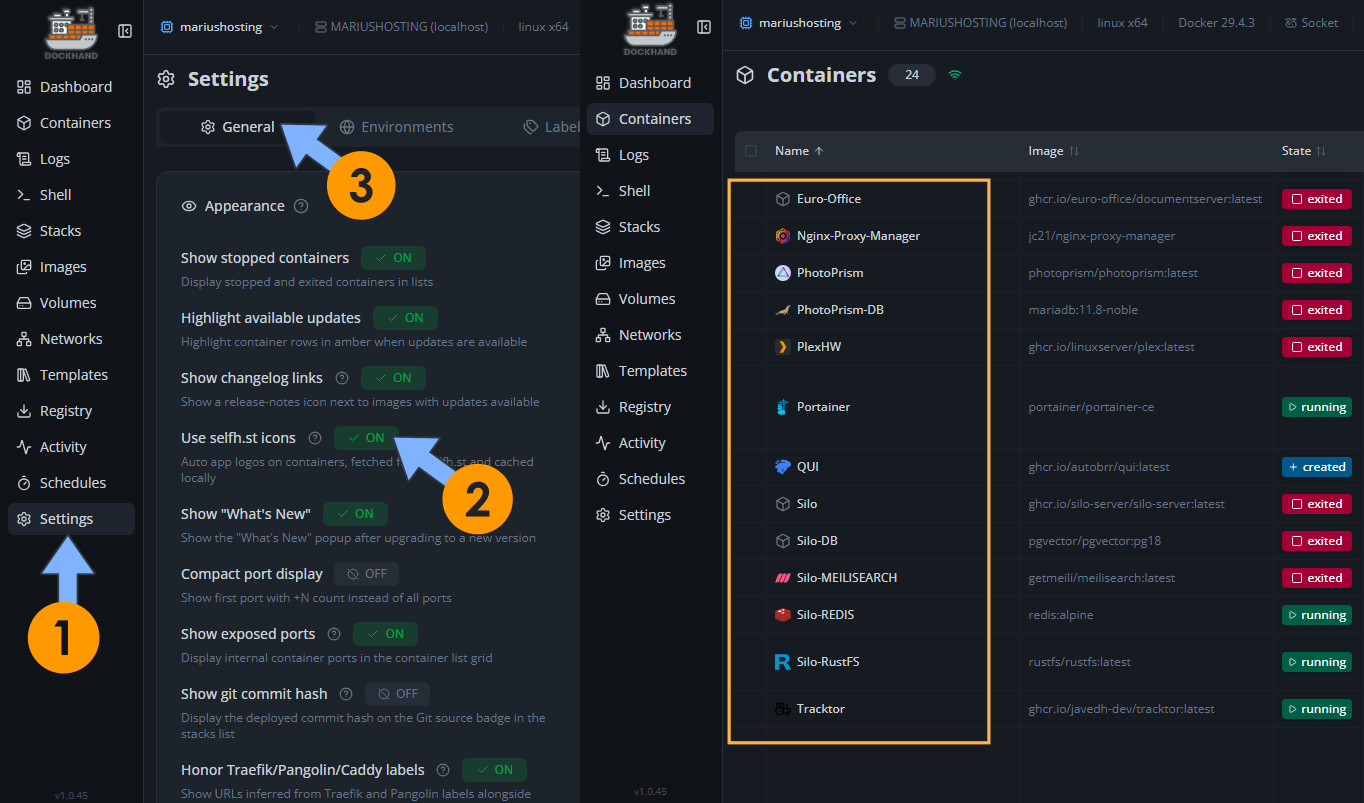
Dockhand also received a nice quality-of-life improvement. Starting with version 1.0.44 (and refined in 1.0.45) you can now set custom icons for containers and stacks, plus automatic container icons. It makes the dashboard much more readable when you manage dozens of services.
UGOS PRO version 1.19.1.0126. On August 31, 2026, UGREEN released the new UGOS PRO firmware version 1.19.1.0126. This update upgraded the system Kernel to version 6.18. This update upgraded the system Kernel to version 6.18. This newer Linux kernel delivers better hardware compatibility, improved power management, enhanced security foundations, and overall system stability. Linux Kernel 6.18 was released on November 30, 2025, and designated as a Long-Term Support (LTS) release supported until December 2027.
That said, I also need to talk about something that weighs on me more and more.
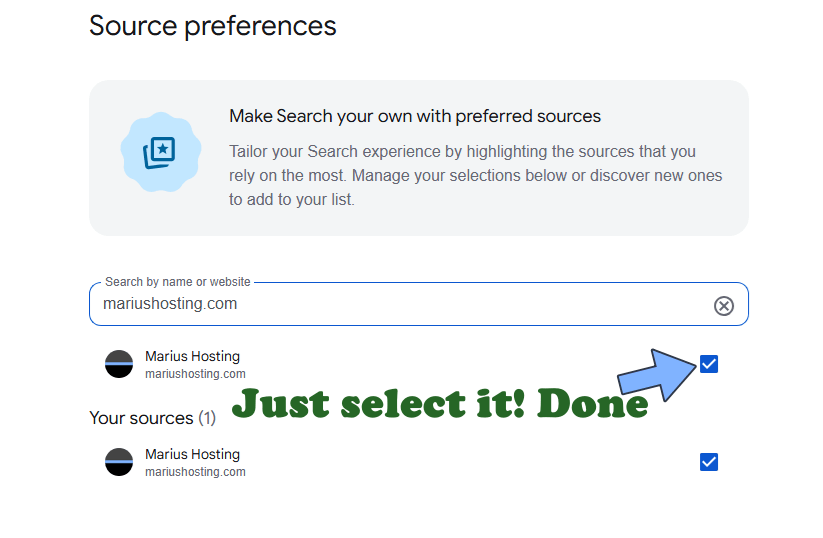
AI systems are literally stealing the content I write. Entire answers, often near word-for-word copy-paste, are served to users with zero credit to this blog. It is frustrating. If you use Google and value the work that goes into these guides, please add mariushosting to your preferred sources. It helps original content surface instead of the generated summaries.
And then there is the other side of the coin. In these 29 days of August 2026, traffic has been extremely high. Hundreds of people read the guides every day, write asking for help, request updates, request new install guides. I answer, I test, I update, I fix. Yet only 6 people have supported the blog. Six. This is not a scolding. It is simply the reality. This site lives solely on donations. There are no ads, no sponsors, no affiliate links, no subscriptions. Just time, electricity, hardware and the will to keep everything current day after day. When AI appropriates the work and the same people who use the guides every week disappear the moment it comes to supporting the person who writes them, it becomes genuinely hard to continue. Together we have built something meaningful: one of the most up-to-date and practical resources for self-hosting on Synology and beyond. If this space has value for you, help me keep it alive.
The intense heat still has not left us. My health is improving slowly, but I have to avoid stressful situations. The insolation on July 4 and the blood-pressure issues that followed left me with anxiety and panic attacks that I do not want to trigger again. I am proceeding carefully, one update at a time, the way I always have. Thank you to everyone who keeps reading, who writes, who supports, and who simply appreciates the quiet work behind every guide.

New articles are already in production. Below you will find the most recent guides updated in August 2026. See you in the next September update.
Immich is a very high performance self-hosted photo and video backup solution directly from your mobile phone. You can run Immich on your Synology NAS and it lets you upload photos and videos from your browser or mobile phone via the dedicated Android Immich app or the iOS Immich app. The Immich user interface feels like Google Photos, especially if you are using the mobile apps. Note: Install Immich on Your Synology NAS.
Paperless-ngx is a document management system that transforms your physical documents into a searchable online archive so you can keep, well, less paper. Note: Install Paperless-NGX on Your Synology NAS.
Dockhand is a modern, self-hosted Docker management platform with an intuitive web interface for homelabs, small businesses, and enterprises. It simplifies container operations, stack deployments, and observability through real-time management (start/stop/restart containers, web terminals, file transfers), a visual Compose editor, GitOps auto-sync, metrics, logs, OIDC/SSO, MFA, vulnerability scans, and multi-host support via the open-source Hawser agent. You can deploy it quickly as a Docker container with no cloud dependencies or telemetry. It’s forever free for personal use. Note: Install Dockhand on Your Synology NAS.
Portainer is a lightweight management UI which allows you to easily manage your Docker host or Swarm cluster. Portainer is meant to be as simple to deploy as it is to use. It consists of a single container that can run on any Docker engine (Docker for Linux, Docker for Synology DSM and Docker for Windows are all supported). Portainer allows you to manage your Docker stacks, containers, images, volumes, networks and more! It is compatible with the standalone Docker engine and with Docker Swarm. Note: Install Portainer on Your Synology NAS.
WordPress is a free and open-source content management system (CMS). It’s the simplest and most popular solution to create your own website or blog. WordPress makes building a website accessible to anyone, even people who aren’t developers. With WordPress you can create any type of website such as blogs, eCommerce stores, portfolio websites, forums, resumes, business websites etc. In this step by step guide I will show you how to install WordPress on your Synology NAS using Docker & Portainer. Note: Install WordPress on Your Synology NAS.
Sync-in is a secure, open-source platform for file storage, sharing, collaboration, and synchronization, giving users full data control through self-hosted infrastructure. It ensures privacy with no tracking or telemetry and offers granular permission management for users and groups at space and file levels. The platform supports cross-device synchronization with native desktop clients for Windows, macOS, and Linux, real-time collaborative document editing via OnlyOffice integration, and organized, secure spaces for personal, team, or public use. Files can be shared with specific users, groups, or via time-limited public links. It includes server-side full-text indexing for fast content search, activity history with notifications, and WebDAV support to mount spaces as remote drives. Note: Install Sync-in on Your Synology NAS.
Zipline is a modern file upload and sharing platform designed for simplicity and flexibility, featuring a sleek dashboard to manage uploads, shortened URLs, and folders. It enables quick setup through Docker, allowing deployment in minutes with easy configuration via the dashboard. Users can upload images, videos, and text files with syntax highlighting, supported by automatic video thumbnails and image compression. Files can be organized using folders and tags, with a gallery view for efficient management. Zipline offers custom URL shortening with performance tracking through metrics. The platform supports extensive customization with themes and embeds for apps like Discord. Security features include password-protected files and URLs, Two-Factor Authentication (2FA), passwordless passkeys, and OAuth2 authentication with Discord, GitHub, Google, and OIDC providers. A robust API, HTTP and Discord webhooks, partial uploads for large files, user quotas, and invite links enhance functionality. Ideal for individuals or teams, Zipline simplifies file and link sharing with a focus on performance and user experience. Note: Install Zipline on Your Synology NAS.
Leantime is an open source project management system for small teams and startups written in PHP, JavaScript and using MySQL as the database. It combines lean product development and agile project management into one platform so that users have the right features from start to finish. Note: Install Leantime on Your Synology NAS.
This guide walks you through the steps to create a dashboard in Grafana to display system metrics for your Synology NAS server, monitored by Prometheus. Note: Install Grafana Dashboard on Your Synology NAS.
LibrePhotos keeps all your photos and metadata on your local server. Your data is never sent to or stored on a 3rd party server. Get the same power as those commercial services without giving up your personal data and privacy. LibrePhotos can register a biometric facial pattern to identify or verify the identity of a subject through an image or video. Note: Install LibrePhotos on Your Synology NAS.
Pixelfed is a free and open-source image sharing social network service. It is decentralized, therefore user data is not stored on a central server, unlike other platforms. The fediverse is a large network of platforms that all speak a common language. Imagine if you could reply to Instagram posts from Twitter, or interact with your favorite Medium blogs from Facebook – federated alternatives like Pixelfed, Mastodon and WriteFreely enable you to do these types of things. Note: Install Pixelfed on Your Synology NAS.
Web-Check will help you get an insight into the inner-workings of a given website: uncover potential attack vectors, analyze server architecture, view security configurations, and learn what technologies a site is using. Currently the Web-Check dashboard will show: IP info, SSL chain, DNS records, cookies, headers, domain info, search crawl rules, page map, server location, redirect ledger, open ports, traceroute, DNS security extensions, site performance, trackers, associated hostnames, carbon footprint. The aim of Web-Check is to help you easily understand, optimize and secure your website. Note: Install Web-Check on Your Synology NAS.
BentoPDF is a powerful, privacy-first, client-side PDF toolkit that allows you to manipulate, edit, merge, and process PDF files directly in your browser. No server-side processing is required, ensuring your files remain secure and private. Note: Install BentoPDF on Your Synology NAS.
Solidtime is a modern, open-source time-tracking application designed for freelancers and agencies. Built with PHP (Laravel) and Vue.js, it offers features like project and task management, client billing, and seamless data imports from tools like Toggl and Clockify. Available as a hosted cloud service or self-hosted via Docker, Solidtime provides a flexible, user-friendly solution for tracking time and managing work efficiently. Note: Install Solidtime on Your Synology NAS.
DashLit is a lightweight, self-hosted start page designed for your server, offering a simple and customizable application hub. It features an intuitive drag-and-drop interface, allowing users to create and organize their start page without editing files. Note: Install DashLit on Your Synology NAS.
💡TREK
TREK is a modern self-hosted, open-source travel planner that lets you and your group collaboratively build complete trips in real time. It combines drag-and-drop itineraries, interactive maps with place search and weather forecasts, budget tracking, packing lists, reservation management, and full PDF exports into one beautiful, installable Progressive Web App with offline support. Fully private and under your control, TREK runs on your own Synology NAS. It includes real-time chat, polls, and secure authentication. It’s perfect for solo adventurers, couples, families, or groups seeking a powerful alternative to scattered notes and commercial apps. Note: Install TREK on Your Synology NAS.
Password Pusher is an opensource application to communicate passwords over the web, similar to Yopass and Private Bin. Links to passwords expire after a certain number of views and/or time has passed. Note: Install Password Pusher on Your Synology NAS.
Dawarich is a self-hosted web app designed to replace Google Timeline (aka Google Location History). It enables you to: visualize your data on an interactive map, import your location history from Google Maps Timeline and Owntracks and explore statistics like the number of countries and cities visited, total distance traveled, and more. Note: Install Dawarich on Your Synology NAS.
Mail-Archiver is an open-source web app that archives, searches, and exports emails from multiple IMAP accounts. It automatically saves incoming and outgoing emails with attachments, syncs folder structures, and supports mailbox migration. A powerful search feature helps find emails quickly, while bulk export to PDF or PST aids backups and compliance. The intuitive dashboard manages accounts and archives. Note: Install Mail Archiver on Your Synology NAS.
Open Archiver provides a robust, self-hosted solution for archiving, storing, indexing, and searching emails from major platforms, including Google Workspace (Gmail), Microsoft 365, PST files, as well as generic IMAP-enabled email inboxes. Use Open Archiver to keep a permanent, tamper-proof record of your communication history, free from vendor lock-in. Note: Install Open Archiver on Your Synology NAS.
Homebox is the inventory and organization system built for the Home User! With a focus on simplicity and ease of use, Homebox is the perfect solution for your home inventory, organization, and management needs. Note: Install Homebox on Your Synology NAS.
Trilium Notes is a hierarchical note taking application with focus on building large personal knowledge bases. You can look at Trilium as your own self-hosted Wikipedia. Note: Install Trilium on Your Synology NAS.
Seerr is a free, open-source media request and discovery manager that serves as the unified successor to Overseerr and Jellyseerr following the teams’ merger on February 14, 2026. It provides a modern, mobile-friendly interface for users to easily discover, browse, and request movies, TV shows, or individual seasons to be added to self-hosted media libraries. Administrators can review and approve requests through a simple dashboard, with automatic integration into automation tools like Sonarr for TV and Radarr for movies to handle downloading and organization. Fully compatible with Jellyfin, Plex, and Emby, Seerr supports library scanning to track availability, granular user permissions, watchlists, blocklists, multiple notification channels, and customizable override rules. Note: Install Seerr on Your Synology NAS.
Linkwarden is a self-hosted, open-source collaborative bookmark manager to collect, organize and archive webpages. The objective is to organize useful webpages and articles you find across the web in one place, and since useful webpages can go away, Linkwarden also saves a copy of each webpage as a Screenshot and PDF, ensuring accessibility even if the original content is no longer available. Additionally, Linkwarden is designed with collaboration in mind, sharing links with the public and/or allowing multiple users to work together seamlessly. Note: Install LinkWarden on Your Synology NAS.
💡RomM
RomM is a self-hosted application for organizing and playing retro game collections through a clean, responsive web interface, ideal for emulator enthusiasts. It scans and enriches your game library with metadata from IGDB, Screenscraper, and MobyGames, supporting over 400 platforms, and fetches custom artwork from SteamGridDB. You can play games directly in the browser using EmulatorJS and RuffleRS, share your library with customizable permissions, and manage games (view, upload, update, delete) from any modern browser. RomM supports multi-disk games, DLCs, mods, patches, manuals, and custom tags for filtering. It integrates with Playnite and muOS, and displays RetroAchievements. Note: Install RomM on Your Synology NAS.
Vikunja is an open source, selfhosted application. With Vikunja you can easily organize all of your tasks in lists. Put lists together in a namespace to keep related stuff grouped together. Vikunja lets you easily share a list or a namespace with another user or a whole team! You can also assign tasks to people so everybody knows who’s working on what. Note: Install Vikunja on Your Synology NAS.
This post was updated on Sunday / September 27th, 2026 at 8:36 PM