
Every website you open, every app that phones home and every smart TV that quietly talks to its maker starts with the same tiny question: a DNS lookup. Whoever answers that question decides what your network sees, what it blocks and what it remembers. For years the choice on a Synology NAS or a UGREEN NAS was simple, you installed Pi-hole or AdGuard Home and you were done. Then Technitium DNS arrived for people who wanted a real DNS server, and now a new name is making noise on GitHub: TelltaleDNS. Born on October 3, 2026, it already has more than 400 stars, and it promises something the others never really did: to explain every single answer it gives. So which one deserves port 53 on your network? Today I put all four side by side, with verified facts only, and I tell you which one I would pick for your situation.
🛡️ TelltaleDNS
TelltaleDNS describes itself as a small, fast DNS resolver and ad blocker that explains every answer. The name comes from sailing: a telltale is the strip of yarn tied to a sail to show what the wind is really doing, and the idea is that DNS shows what every device on your network is really doing. It is written in Rust and ships as one static binary. The official Docker image is built FROM scratch, which means there is no operating system inside at all, no shell and no package manager, just the binary, a time zone database and the web interface embedded in it. The amd64 image I checked on GHCR (GitHub) is about 15 MB compressed, and it is published for amd64, arm64 and 32 bit Raspberry Pi OS. The developer claims an idle memory use of about 14 MiB and a million blocked names held in 60 MiB, with measurements published in the repository.
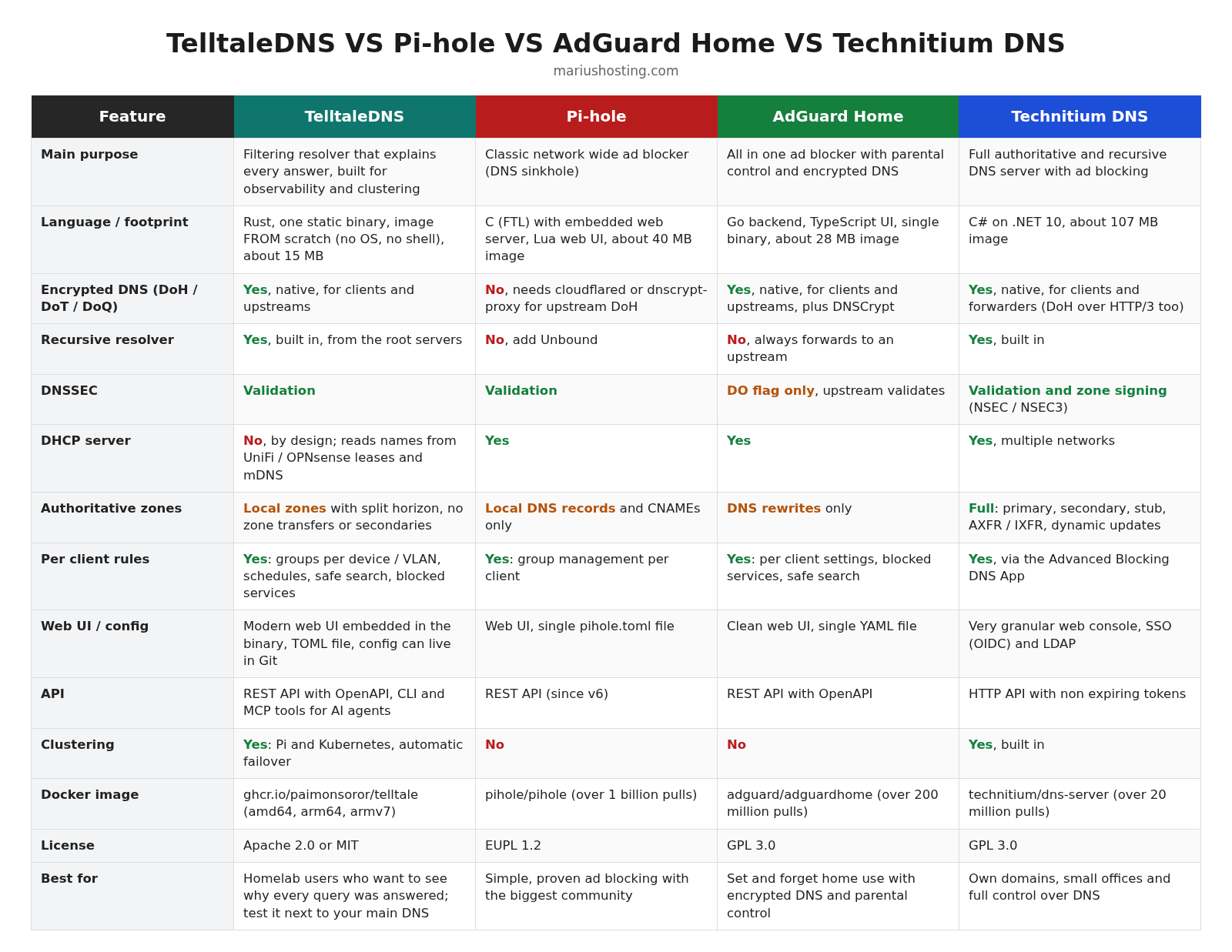
What makes it different is the query log. Each query is tied to a named device, every stage is timed and the log tells you why the answer was given, which list and which rule blocked it and which upstream replied. You get blocklists, groups for each network or VLAN, schedules, safe search, blocked services, rewrites and quick rules, and before saving a new rule you can see what it would have done to yesterday’s real traffic. Encrypted DNS works in both directions, DNS over TLS, DNS over HTTPS and DNS over QUIC for your devices and towards your upstreams, together with DNSSEC validation and full recursion from the root servers when you do not want to forward to anyone. It can also serve local records and whole local zones with split horizon, although it is not meant to be a public authoritative server, so there are no zone transfers or secondary zones. On top of that, you get clustering across a Raspberry Pi and Kubernetes, configuration stored in Git, Prometheus metrics, OpenTelemetry, dnstap, a documented REST API with OpenAPI, a command line tool and even MCP tools for AI agents. There is one thing it deliberately does not do: DHCP. It reads device names from your router lease list (UniFi and OPNsense) and from mDNS instead.
Now the honest part. The latest release is 0.7.0, published on November 16, 2026, so we are still before version 1.0 and the developer clearly warns that configuration keys and APIs can still change between releases. It is built by a single maintainer, and the README openly says it is developed with Claude Code, with every commit it worked on marked as such. The license is Apache 2.0 or MIT, at your choice.
Note: How to Install TelltaleDNS on Your Synology NAS.
Note: TelltaleDNS Official FAQ.
🛡️ Pi-hole
Pi-hole is the grandfather of network wide ad blocking. The project started in 2014, the main repository has more than 62,000 stars and the official Docker image has passed one billion pulls on Docker Hub. The current versions are Core v6.6, FTL v6.9 and Web v6.6.1, all packed in the Docker image 2026.11.0 released on November 11, 2026. If you still remember Pi-hole as lighttpd plus PHP, forget it: since version 6 the web interface is served by the embedded web server inside FTL, the engine written in C, the settings live in a single configuration file and everything is exposed through a proper REST API. Pi-hole validates DNSSEC, has a built in DHCP server, lets you manage groups and clients so different devices get different lists, and handles local DNS records and CNAMEs for your LAN.
Where Pi-hole still needs help is encrypted and recursive DNS. The official documentation tells you to add cloudflared or dnscrypt-proxy for DNS over HTTPS, and Unbound if you want to resolve from the root servers. It does not offer DNS over TLS, HTTPS or QUIC to your own devices either. In exchange, you get the biggest community of all, thousands of guides and blocklists, and a project that has proven itself for more than a decade. The license is EUPL 1.2.
Note: How to Install Pi-Hole on Your Synology NAS.
Note: How to Install Pi-Hole on Your UGREEN NAS.
Note: How to Install Pi-Hole on Your Asustor NAS.
🛡️ AdGuard Home
AdGuard Home is the polished all in one option. The backend is written in Go, the interface in TypeScript, the latest release is v1.0.0 from November 19, 2026, and the repository has more than 38,000 stars with over 200 million Docker pulls. Encrypted DNS is native and complete: it can use DNS over HTTPS, DNS over TLS, DNS over QUIC and DNSCrypt upstreams, and it can also act as a DNS over HTTPS, TLS or QUIC server for your phones and laptops without any extra container. It has a built in DHCP server, per client settings, blocked services so you can stop a single app or platform with one click, forced safe search, parental control, DNS rewrites and access settings to decide who can use it. Everything is stored in a single YAML file, there is a REST API, and it can run without root privileges.
Two details are often misunderstood. AdGuard Home does not resolve recursively by itself, it always forwards to an upstream (which can of course be your own Unbound). And its DNSSEC option, according to the official wiki, only asks the upstream for DNSSEC data by setting the DO flag, so the actual validation is done by the upstream resolver. It does not host real authoritative zones either, rewrites are what you use for local names. The license is GPL 3.0.
Note: How to Install AdGuard on Your Synology NAS.
Note: How to Install AdGuard on Your UGREEN NAS.
Technitium DNS Server plays in a different league. It is written in C# and runs on .NET 10, the latest version is v15.6.2 from October 17, 2026, and it is a complete authoritative and recursive DNS server that also happens to block ads. You can host DNS over TLS, DNS over HTTPS (with HTTP/1.1, HTTP/2 and HTTP/3) and DNS over QUIC services, use encrypted forwarders, validate DNSSEC and even sign your own zones with NSEC or NSEC3. It supports primary, secondary, stub and conditional forwarder zones, zone transfers with AXFR and IXFR, dynamic updates, a DHCP server that can serve multiple networks, built in clustering to manage several instances from one console, single sign on with OpenID Connect and, since version 15.5, LDAP authentication. Per client blocking and split horizon are available through its DNS Apps, such as Advanced Blocking.
The price you pay is complexity and weight. The web console is very granular and feels closer to an enterprise tool than to a home gadget, and the amd64 Docker image is about 107 MB compressed on Docker Hub, against roughly 40 MB for Pi-hole, 28 MB for AdGuard Home and 15 MB for TelltaleDNS. On a NAS with a few gigabytes of RAM this is not a real problem, but it shows the difference in philosophy. The license is GPL 3.0.
Note: How to Install Technitium on Your Synology NAS.
Note: How to Install Technitium on Your UGREEN NAS.
Note: How to Install Technitium on Your Asustor NAS.
🔐 Encrypted DNS and Privacy
This is where the four really split. TelltaleDNS, AdGuard Home and Technitium all speak DNS over TLS, HTTPS and QUIC natively, both towards the internet and towards your own devices, so you can give your phone an encrypted DNS profile that points straight at your NAS. Pi-hole does none of this by itself and relies on an extra container like cloudflared or dnscrypt-proxy for encrypted upstreams. If privacy from your ISP is your main reason to self host DNS, keep in mind that encryption only hides the lookups from whoever sits in the middle. The public resolver you forward to still sees everything, which is why recursion matters.
🌍 Recursion, DNSSEC and Local Zones
Running your own recursive resolver means asking the root servers and the authoritative servers directly, so no Cloudflare, Google or Quad9 gets a full list of your lookups. Technitium and TelltaleDNS do this out of the box, with QNAME minimization so each server only sees the part of the name it needs. Pi-hole and AdGuard Home need Unbound next to them for the same result. For DNSSEC, Technitium, TelltaleDNS and Pi-hole validate answers themselves, while AdGuard Home leaves validation to its upstream. When it comes to your own domains, Technitium is the only real authoritative server of the group with zone transfers and zone signing. TelltaleDNS can be the authority for home and office zones with split horizon, while Pi-hole and AdGuard Home stop at local records and rewrites, which is honestly all most homes need.
📡 DHCP and Device Names
Pi-hole, AdGuard Home and Technitium all include a DHCP server, which is handy if your ISP router is locked down and you want proper device names in your statistics. TelltaleDNS refuses DHCP on purpose and leaves it on your router, then learns names from UniFi or OPNsense leases, from what devices announce over mDNS or from what you type in the interface. It even tries to recognize what a device is, a camera, a thermostat, a media player, from its maker and the names it asks for. If your router can not change DNS or DHCP settings, remember this before you choose.
🐳 Running Them on Your NAS
All four have an official Docker image and all four run happily on a Synology NAS, a UGREEN NAS or an Asustor NAS. Pi-hole, AdGuard Home and Technitium have years of NAS installations behind them and you will find my step by step guides at the beginning of this article. The official compose file for TelltaleDNS uses host networking so it can see the real client addresses and MAC addresses, which means nothing else may be listening on port 53 of your NAS. It also ships with a read only root filesystem, all capabilities dropped, except the one needed for port 53, signed images and release binaries that carry an SBOM. From a security point of view, this is the cleanest container of the four. It can also import your settings from Pi-hole and Technitium, while AdGuard Home users will have to add their lists again, although lists written in AdGuard syntax work as they are.
🏆 Which One Should You Choose?
If you want something that just works and you will forget about it for months, choose AdGuard Home. It gives you encrypted DNS, blocked services, safe search and a clean interface with zero extra containers. If you love a huge community, endless guides and a project that has been rock solid for more than ten years, Pi-hole is still a great choice, especially now that version 6 has removed so much of the old baggage. If you host your own domains, need secondary zones, DNSSEC signing, DHCP for several networks or a real cluster for a small office, go straight to Technitium DNS, nothing else here comes close.
And TelltaleDNS? It is the most interesting newcomer I have seen in this field for a long time. If you want to know exactly why every query was blocked or answered, if you like the idea of testing a blocklist against yesterday’s traffic before applying it, or if you run a homelab with Kubernetes and Prometheus, give it a try. Just remember that it is a few weeks old, before version 1.0, driven by one maintainer, and that configuration and API changes are still possible. My advice is to test it next to your current DNS server, for example by pointing a few devices at it, and to keep your trusted Pi-hole, AdGuard Home or Technitium as your main resolver until TelltaleDNS reaches a stable 1.0.
🍀Note: Synology: AdGuard VS Pi-Hole.
🍀Note: Top Docker Containers to Block ADS.
🍀Note: Best Docker Containers For Privacy.
This post was updated on Sunday / November 22nd, 2026 at 12:02 AM