
Remember PHP2Shell? Less than a month ago it kept a lot of us awake, and many of you applied my mitigation within hours. Well, the story did not end there. Today, November 19, 2026, the security firm depthfirst disclosed phpAfterShell, tracked as CVE-2026-126714, and the name is no accident. The researchers went back to the PHP2Shell patch, looked at what happens to your session files after it, and found a brand new road to remote code execution. PHP rated it Critical with a CVSS 4.0 score of 9.2 and shipped the fix this afternoon in PHP 8.2.36, 8.3.37, 8.4.28 and 8.5.13. So what does this mean for your Synology NAS, for Web Station and for the WordPress you host from home? My goal on mariushosting has always been to inform you, not to scare you, and if you followed my PHP2Shell guide, you already did the most important thing.
🛡️ What Is phpAfterShell?
Every time a visitor logs in to a PHP website, PHP keeps a small session file on the server with their data. By default, these files live on disk, the so called files session handler. When PHP updates one of them, it does not replace the file in one single step: it writes the new data over the old one. Depthfirst discovered that, if the PHP worker is killed in the middle of that write, the file can end up with the beginning of the new session glued to the end of the old one. With carefully chosen data, this mixed file still looks valid to PHP, and the next time the website opens the session, PHP rebuilds objects that the attacker planted. Chained with a second memory bug in PHP itself, the researchers reached remote code execution. The easiest way in is the same feature that made PHP2Shell possible: session upload progress which lets an anonymous visitor push data into a session with a simple file upload before your website code even starts. You can read the official details in the PHP security advisory GHSA-fm2m-fjf5-v3cp.
Now the calm part. This is not a one click exploit. PHP itself explains that a successful attack needs the attacker to influence the session data, to interrupt the write at exactly the right moment and to find a suitable chain of objects to abuse. Depthfirst kept the final part of its exploit chain private for coordinated disclosure, and at the time of writing I could not find any report of attacks in the wild. Websites that store sessions in Redis or in a database are not affected by this specific bug. The same PHP release also fixes CVE-2026-115560, the session flaw I wrote about on October 23, 2026, along with several other security issues listed in the official PHP changelog.
🛡️ Is Your Synology NAS Affected?
If you host a website with Web Station, most likely yes, at least on paper. The latest PHP packages available for DSM are PHP 7.4.33, PHP 8.0.30, PHP 8.1.34, PHP 8.2.35, PHP 8.3.36 and PHP 8.4.27, the same packages that fixed PHP2Shell. Depthfirst says clearly that those October releases do not contain the phpAfterShell fix. Don’t forget PHP 8.2 even if your website runs on PHP 8.4 because phpMyAdmin still relies on it. For PHP 7.4, PHP 8.0 and PHP 8.1 the picture is less clear. These branches are end of life, and Depthfirst says that the official end of life mitigation builds are not affected because they no longer open the session during uploads, while older unpatched builds still are. If you do not use Web Station or any PHP website on your NAS, this flaw does not concern you.
🛡️ What Synology Has Said So Far
At the time of writing, Synology has not published anything about phpAfterShell. There is no advisory for CVE-2026-126714 on the Synology Security Advisory page and no new PHP package in the Synology archive. The Synology PSIRT is busy with two other fronts right now. The newest advisories are Synology-SA-26:20 NGINX2Root and Synology-SA-26:21 for the DSM OAuth API, both still ongoing with a DSM update scheduled for November 20, 2026, as I explained in my article about the critical Apache and NGINX flaws. The latest post from Synology Japan on X also talks only about nginx and OAuth. For PHP2Shell, Synology published Synology-SA-26:14 and later marked it as Resolved, with patched packages for PHP 7.4 up to PHP 8.4. Keep in mind that Synology announces vulnerabilities only when the fix is available, so silence today does not mean they are ignoring it. Still, in my experience, their PHP packages take some time to arrive, and that is exactly why the mitigation below matters.
🛡️ Already Followed My PHP2Shell Guide? Good News
If you applied my PHP2Shell mitigation in October, you have already closed the easiest door. In that guide I asked you to set session.upload_progress.enabled to 0 in your Web Station PHP profiles, and this is exactly the temporary measure that both PHP and depthfirst recommend today for phpAfterShell. Leave that setting as it is. I want to be honest with you though: PHP points out that disabling upload progress removes the easiest path, but not the bug itself because a website that stores large amounts of user controlled data in its sessions could still be exposed. That is why the real fix remains the updated PHP package, and you should install it as soon as Synology releases it.
🛡️ Do This Today: Disable Session Upload Progress
If you never applied the PHP2Shell mitigation, do it now. It takes two minutes. In my experience, very few websites need upload progress, and normal file uploads keep working exactly as before. ⚠️Note: Repeat the steps for every PHP profile you use, including the one for PHP 8.2.
STEP 1
Please Support My work by Making a Donation.
STEP 2
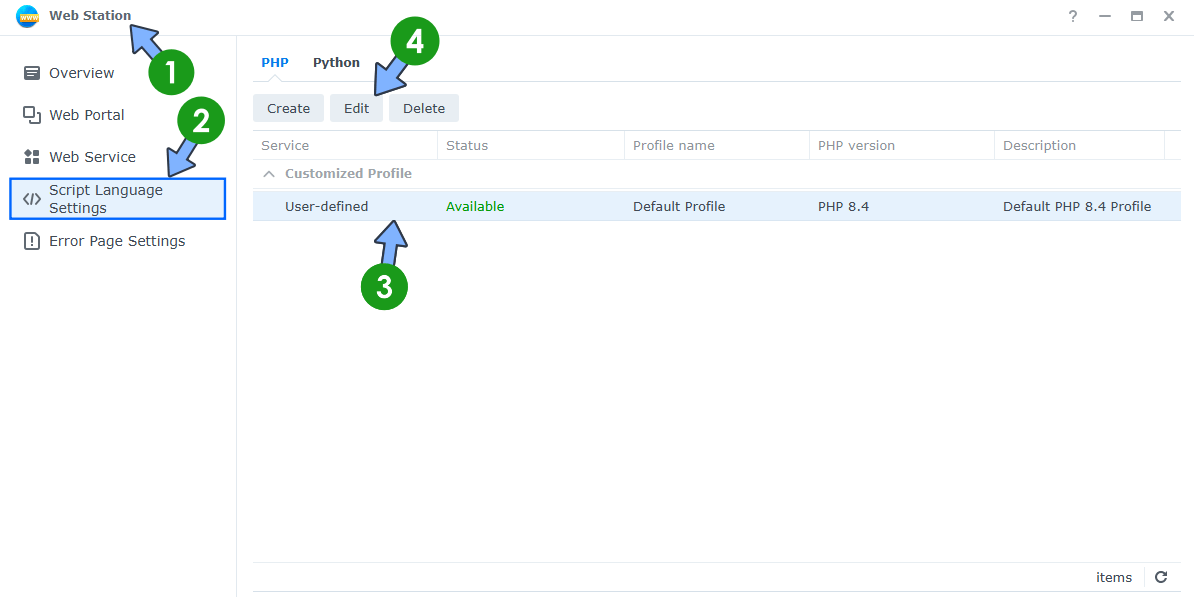
Open the Web Station app on your Synology NAS. On the left sidebar, click Script Language Settings. Select your PHP profile. Click the Edit tab. Follow the instructions in the image below.
STEP 3
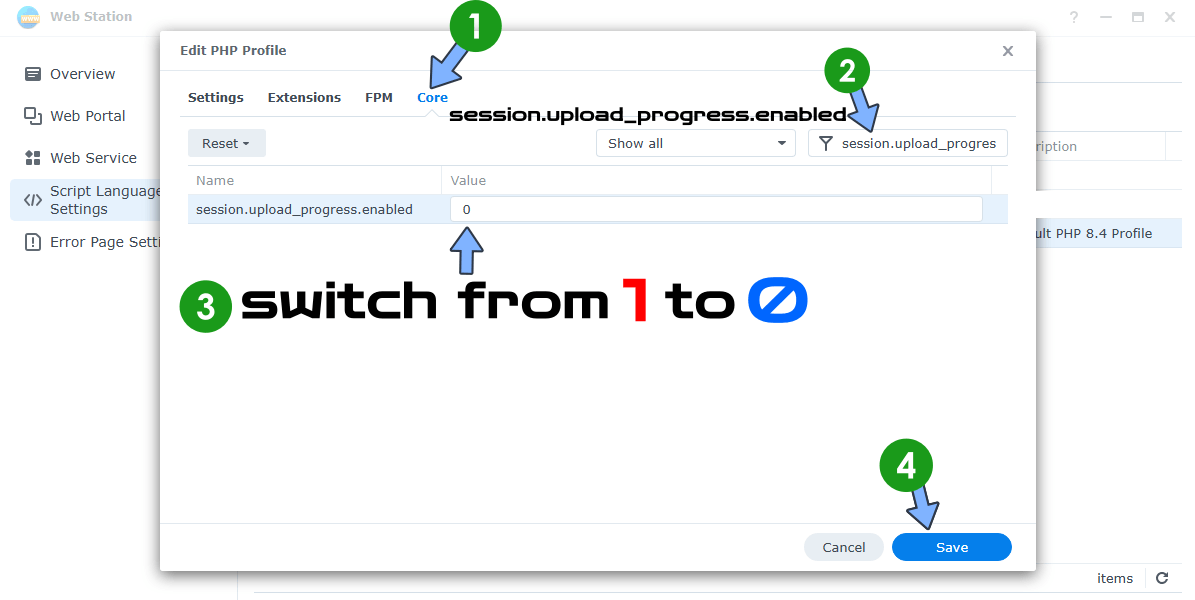
A new pop up window will open. Click the Core tab. Search for session.upload_progress.enabled and change the Value from 1 to 0. Click Save. Follow the instructions in the image below.
STEP 4
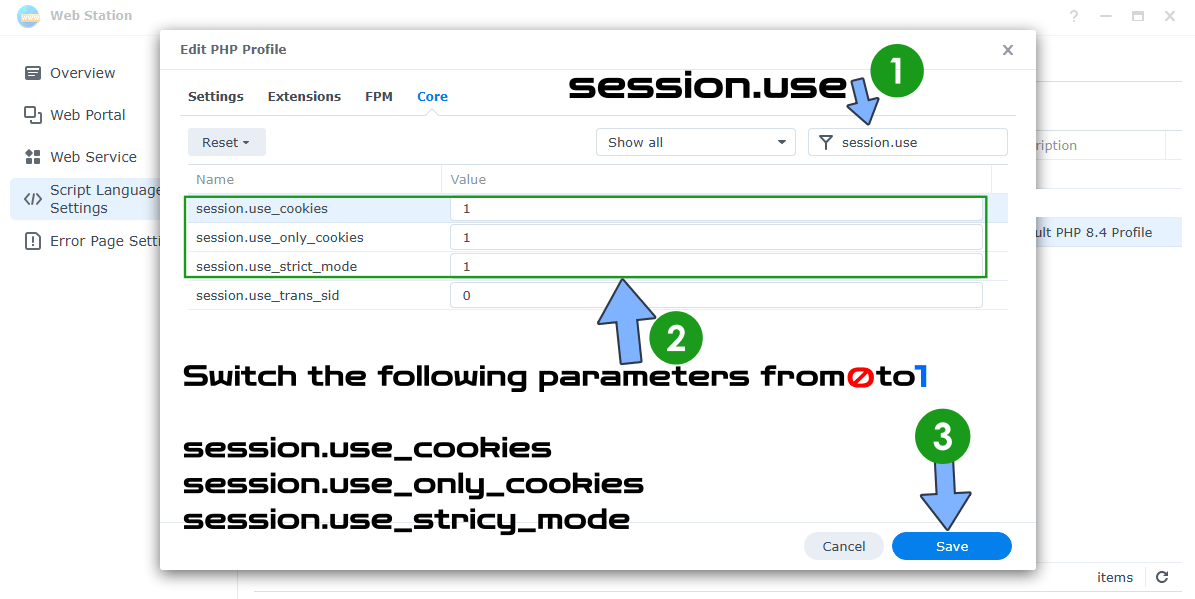
Edit your PHP profile again by following the same exact STEP 2 as before. Click the Core tab. Search for session.use and change the Value from 0 to 1 for session.use_cookies, session.use_only_cookies and session.use_strict_mode. These are standard hardening settings recommended by PHP itself and they are good practice anyway. Click Save. Follow the instructions in the image below.
STEP 5
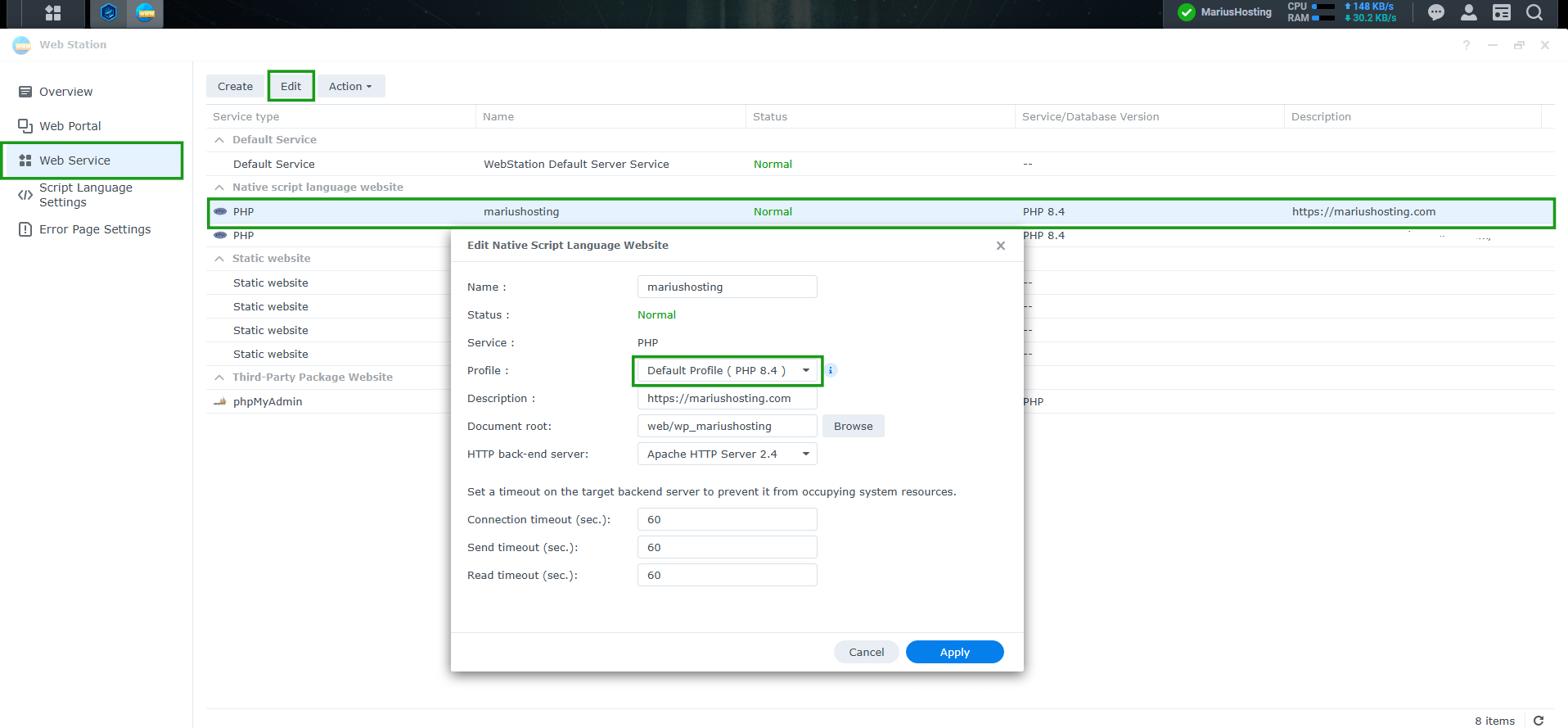
Make sure your website uses the PHP profile where you changed the parameters in Web Station / left sidebar Web Service. Follow the instructions in the image below.
🛡️ WordPress Installed With My Guide
If you installed WordPress following my step-by-step Docker guide, you can relax. That setup does not use the Synology PHP packages at all: PHP runs inside the official WordPress Docker image, and my guide uses the wordpress:php8.5 tag. The good news is that the image was rebuilt today, November 19, 2026, and wordpress:php8.5 now ships PHP 8.5.13 which already contains the phpAfterShell fix. On top of that, WordPress core does not use PHP sessions and manages logins with its own cookies, so the session files this flaw abuses are normally not involved. Some plugins and themes do use PHP sessions though, so updating is still the right move. Update your stack in Portainer or Dockhand so it pulls the new WordPress image, then check the version with the following command via SSH:
sudo docker exec WordPress php -v
or the following code in your shell if you use Dockhand or Portainer:
php -v
If the output says PHP 8.5.13 or newer, you are patched. The same applies to any other PHP container you run: as soon as its image is rebuilt on PHP 8.2.36, 8.3.37, 8.4.28 or 8.5.13, pull it and redeploy.
🛡️ What About Redis?
For years I have recommended pairing Redis with WordPress on a Synology NAS. If you run WordPress with Web Station and not in Docker, my guide Synology: Add Redis Object Cache to WordPress shows you how to run a small Redis container next to your website and connect it with the Redis Object Cache plugin by Till Krüss. My Docker guide goes one step further, with Redis already integrated in the stack: the WordPress-REDIS container starts together with WordPress and MariaDB, and the plugin connects to it in a couple of clicks. As far as I know, I am the only one who has been publishing WordPress guides with Redis integrated for years, and I did it for many reasons, from speed to stability and security. I have been using Redis here on mariushosting since the beginning of 2023, and I would not go back.
Now let me be precise, because with security, accuracy matters more than a nice headline. phpAfterShell does not affect PHP sessions stored in Redis, but the Redis Object Cache plugin caches WordPress objects and database queries, it does not move PHP sessions into Redis. Moving them would mean setting session.save_handler to redis and session.save_path to your Redis server in PHP, with the phpredis extension installed, and neither of my guides changes that setting. So Redis is not what protects you from this specific flaw. What protects you is the patched Docker image, the fact that WordPress core does not use PHP sessions and the upload progress setting in Web Station. Keep Redis for what it does best: a faster website and much less work for your NAS.
🛡️IP Block List
I also maintain a regularly updated IP Block List that you can import into your Synology NAS or Synology Router: ➡️ https://mariushosting.com/ip-block-list/ It contains tens of thousands of known malicious IPs. Importing it (and setting the expiration to Forever) reduces the volume of automated scanners and opportunistic attackers that even reach your NAS and Web Station. It is a supporting layer and does not replace the PHP mitigation above.
🛡️ What to Do Next
Keep session.upload_progress.enabled set to 0, and keep an eye on Package Center and on the Synology Security Advisory page. When Synology releases PHP packages based on PHP 8.2.36, 8.3.37 and 8.4.28, or packages that list CVE-2026-126714 as fixed, install them right away, and remember to update PHP 8.2 too. Tomorrow, November 20, 2026, you also have the DSM update for NGINX2Root and OAuth, so it will be a busy couple of days for your NAS, nothing more. As soon as Synology publishes an advisory or new PHP packages, I will update this article. Bookmark this page and stay tuned. A calm routine of updates protects your NAS far better than any panic.
Note: depthfirst: phpAfterShell Technical Analysis.
Note: PHP Security Advisory GHSA-fm2m-fjf5-v3cp.
Note: Synology: Mitigating PHP2Shell (CVE-2026-109618 / CVE-2026-109619).
This post was updated on Thursday / November 19th, 2026 at 8:25 PM