

In just one week, the two web servers that power almost every self-hosted website got hit by serious HTTP/2 bugs. First came CVE-2026-119618 in Apache HTTP Server, fixed on November 11, 2026. Then on November 18, 2026 F5 disclosed CVE-2026-123007 and CVE-2026-123633 in NGINX, two flaws that can lead to remote code execution without any login. This second part matters a lot for you, because nginx is the web server built into DSM. It answers when you open DSM in your browser, it sits in front of Web Station and it runs every rule you created in the DSM reverse proxy. Before we go any further, let me be clear about one thing. My goal on mariushosting has always been to inform you, not to scare you. I will leave the fearmongering and the dramatic thumbnails to some well known YouTubers. What you will find here are the facts, what they really mean for your Synology NAS and one simple setting that protects you today.
🛡️ Do This Today: Turn Off HTTP/2
All three flaws need HTTP/2 to be reachable. Turn it off, and the vulnerable code is simply never used. On DSM, the HTTP/2 checkbox controls nginx directly, so this single change is the most effective thing you can do while we wait for Synology. Your browser falls back to HTTP/1.1 automatically and your sites keep working exactly as before.
- Open Control Panel.
- Go to Network / Connectivity.
- Uncheck Enable HTTP/2.
- Click Apply.
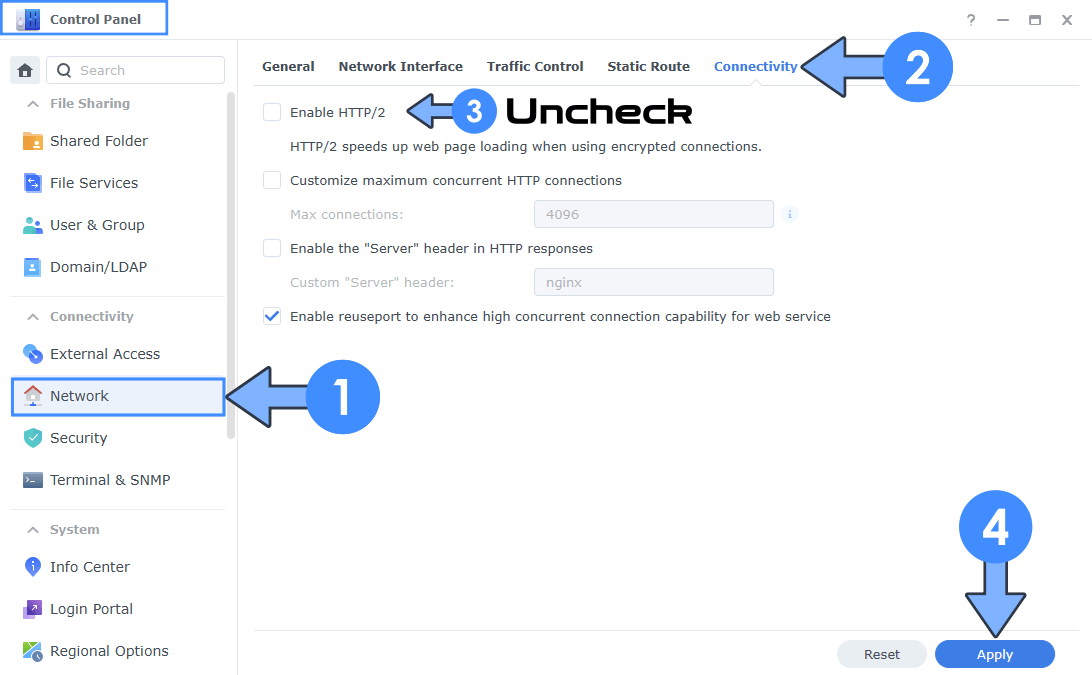
If the box was already unchecked, nothing changes and you can relax a little. According to the Synology Knowledge Center, you have to tick this option yourself to enable HTTP/2, so a NAS that was never touched should not have it on. But many of you turned it on years ago, some of you following my own guides, and that is exactly why you should check it now. Want to be sure? From any computer, run curl -sI –http2 https://yourdomain.synology.me (use your own address and port). If the first line of the answer starts with HTTP/2, it is still on. If it starts with HTTP/1.1, you are done. You can also open your browser developer tools, go to the Network tab and look at the Protocol column: h2 means HTTP/2, http/1.1 means you are fine.
Note: When or if Synology release a patch for this, you can enable HTTP/2 again because it is very useful.
🛡️ The NGINX Flaws Explained
CVE-2026-123007 is an integer underflow in the HTTP/2 flow control of nginx. The server miscalculates how much data a client allows it to send, and that leads to memory corruption. It affects nginx open source from 1.9.5, a version from 2015, up to 1.31.8, and it is the more worrying of the two because nginx only needs HTTP/2 enabled on a listening port. Researchers showed code execution even on a server delivering plain static files. CVE-2026-123633 is a use after free that appears when nginx works as a reverse proxy and runs low on free connection slots, so it closes an HTTP/2 connection that is still in use. It affects nginx from 1.19.7 to 1.31.8. Both are fixed in nginx 1.30.7 stable and 1.31.9 mainline. F5 and Wiz rate them 9.2 Critical on CVSS 4.0, while CERT-EU lists them at 8.1. The same F5 advisory covers five code execution flaws in total, but the other three need HTTP/3, a mail proxy or very special resolver settings, which you will not find on a normal DSM setup. Now the calm part: according to CERT-EU there is no exploitation in the wild so far. Researchers from Wiz and Rapid7 demonstrated working attacks in their labs, and Rapid7 noted that its attack against CVE-2026-123007 needs a long lived connection and a fast network. Disabling HTTP/2 blocks both flaws. Note: nginx security advisories.
🛡️ Is Your Synology Affected?
Synology does not publish the nginx version inside DSM, but you can see it yourself over SSH with nginx -v. Users report nginx 1.23.1 on DSM 7.2 and on DSM 7.3.2, which falls inside the vulnerable range of both CVEs. Synology may have backported some fixes into its own build, so the version number alone does not tell the whole story. Synology is working on a fix, and as you will read below, it only publishes an advisory once the fix is ready. So think of it this way. If Enable HTTP/2 is on, the nginx that serves DSM, Web Station and your DSM reverse proxy rules is potentially exposed, and the reverse proxy is exactly the situation described by CVE-2026-123633. If HTTP/2 is off, both nginx flaws are out of reach. It is that simple, and it is why the checkbox above comes first.
🛡️ The Apache Flaw Explained
CVE-2026-119618 is a race condition in the assign_headers() function of Apache’s mod_http2 module. Two threads can end up using the same memory, the heap gets corrupted and an attacker can turn that into code running with the privileges of the web server, with no login needed. It affects Apache HTTP Server 2.4.55 through 2.4.70 and it is fixed in 2.4.71. Apache rates it critical, NVD lists a CVSS 3.1 score of 8.1 High. A public proof of concept is online, and on November 17 the Cyber Security Agency of Singapore reported that the flaw is reportedly being exploited. Only Apache servers with HTTP/2 enabled are affected. The official Apache HTTP Server 2.4 package in Package Center is still at 2.4.63-0155, released on October 8, 2025, right in the affected range. On DSM, Apache is the back end server that Web Station places behind nginx, and Synology does not document whether HTTP/2 can ever reach it. Either way, with HTTP/2 off, you close that door too. Note: Apache HTTP Server 2.4 vulnerabilities.
🛡️ Reverse Proxy, Web Station and Docker
After the global checkbox, take two more minutes. Open Control Panel / Login Portal / Advanced / Reverse Proxy and edit each rule, then open your portals in Web Station. If any of them shows its own HTTP/2 option, untick it there too. Then look at your Docker containers, because they are not covered by DSM at all. A container ships its own web server, and the HTTP/2 checkbox in DSM does nothing for it. If you run Nginx Proxy Manager, update it now: version 2.17.1, released on November 19, uses an OpenResty base with the fixes for these flaws backported. Until you update, you can untick HTTP/2 Support in the SSL tab of each proxy host. If you use the official nginx image, pull 1.30.7, 1.31.9 or newer, which are already on Docker Hub. For any other container that bundles nginx, check that its maintainer has published an image with nginx 1.30.7 or 1.31.9 or with the fixes backported, then pull it and redeploy in Dockhand or Portainer. Note: How to Install Nginx Proxy Manager on Your Synology NAS and How to Install Nginx Proxy Manager on Your UGREEN NAS.
🛡️ WordPress Installed With My Guide
If you installed WordPress following my step-by-step Docker guide, you are in a good position. That setup does not use the Synology Apache package. Apache runs inside the official WordPress Docker image, and the current image ships Apache 2.4.71 with the fix, as I wrote in my WordPress 7.1.5 article. The container also sits behind the DSM reverse proxy and receives plain HTTP on port 8195, so HTTP/2 never reaches the Apache inside it. Remember that the DSM reverse proxy in front of it is nginx, so the HTTP/2 checkbox still applies to you. A container only gets the new Apache when you pull the updated image and redeploy the stack, and you will not find its version in Package Center. You check it inside the container, for example over SSH with:
sudo docker exec WordPress apache2ctl -v
or the following code in your shell if you use Dockhand or Portainer:
apache2ctl -v
If the output says Apache/2.4.71 or newer, you are patched. If it shows an older version, update the stack in Portainer or Dockhand so it pulls the latest image, then check again.
🛡️ What About SEO?
Many of you run a real website from home, so let me answer before you ask. Turning off HTTP/2 has no meaningful direct impact on SEO, because Google does not use HTTP/2 as a ranking factor. The only possible effect is indirect: HTTP/2 can load a page with many small files a little faster, so you might notice a small difference in speed. For a temporary security fix that is a price worth paying, and with good caching and Redis on your WordPress you will hardly see it.
🛡️ I Have Informed Synology
I have already informed Synology’s security team about these flaws. I will be honest with you though. Over the years I have contacted Synology’s security team about Apache more than once, and in my experience nothing came of it, not even one update that followed my reports. This time, though, there is good news: Synology is already working to resolve the problem. If you open the Synology Product Security Advisory page and do not see these CVEs yet, do not worry. Synology states clearly that it does not announce security vulnerabilities publicly until fixes are available, so the advisory will appear together with the patch. Until then, the HTTP/2 checkbox is the solution that works today, and as soon as Synology publishes its advisory and the update, you will read it here first.
🛡️IP Block List
I also maintain a regularly updated IP Block List that you can import into your Synology NAS or Synology Router: ➡️ https://mariushosting.com/ip-block-list/ It contains tens of thousands of known malicious IPs. Importing it (and setting the expiration to Forever) reduces the volume of automated scanners and opportunistic attackers that even reach your NAS and Web Station.
🛡️ What to Do Next
Keep an eye on Control Panel / Update & Restore, on Package Center and on the Synology Security Advisory page. When Synology releases a DSM update that clearly lists CVE-2026-123007 and CVE-2026-123633 as fixed, install it and only then go back to Network / Connectivity and tick Enable HTTP/2 again. If you use the Synology Apache package, wait for an Apache HTTP Server package based on 2.4.71, or one that lists CVE-2026-119618 as fixed, before you turn it back on. In the meantime, keep your containers updated, expose only the services you really need, and if something looks strange, a quick look at your logs is always a good habit. A calm routine of updates protects your NAS far better than any panic.
Note: Rapid7: CVE-2026-123007 Technical Analysis.
Note: CSA Singapore Alert AL-2026-164.
Note: How To Enable HTTP/2 on Synology NAS.
This post was updated on Thursday / November 19th, 2026 at 12:25 PM