

Hey everyone, if you’re running a Synology NAS and host your website from home and just saw the sudden wave of posts on the web about two critical PHP vulnerabilities (CVE-2026-109618 and CVE-2026-109619, better known as PHP2Shell), take a deep breath because you’re in the right place at mariushosting. These bugs are serious as they affect almost every PHP version still in use, and while the official PHP security patches are being released today, Synology will not be shipping an updated package for your NAS today. Just like in previous security incidents, their PHP updates tend to lag behind, sometimes by days or even weeks or months or years. That’s exactly why I’m writing this: so you have a clear, practical fix you can apply right now, without waiting for a PHP Package Center update. As always, I try to get this kind of vital information out to you as fast as possible so you can protect your Synology NAS device before most people even realise there’s a problem.
🪂Good News: Synology Has Released The Official PHP Packages That Include The Security Fixes For CVE-2026-109618 and CVE-2026-109619 (PHP2Shell).
Your Internet friend Marius jumped on this as soon as it broke, publishing the temporary mitigations while most people were still figuring out what was happening. That early guidance helped a lot of you reduce the risk quickly and avoid what could have been a much messier situation. Thanks for trusting the site and acting fast. It made a real difference. Shortly after the vulnerability was disclosed, many users were able to apply the temporary PHP mitigations immediately. This significantly reduced exposure during the critical window before the official packages became available.
Available patched packages.
PHP 7.4.33 (package 7.4.33-0131)
PHP 8.0.30 (package 8.0.30-0122)
PHP 8.1.34 (package 8.1.34-0120)
PHP 8.2.35 (package 8.2.35-0171)
PHP 8.3.36 (package 8.3.36-0051)
PHP 8.4.27 (package 8.4.27-0051)
📦How to update: Download the new PHP package from the list above. Open Package Center on your Synology NAS. Click Manual Install then upload the new version.
🧣Recommendation: Prefer the official package update over the temporary configuration changes. Once you are on the patched version, the PHP2Shell vulnerability is properly fixed. The temporary mitigations described in this guide remain useful only if you cannot update immediately or you have a lower PHP version.
ℹ️Good to know: If you host a website on your NAS, don’t update only the PHP version used by Web Station (for example PHP 8.4). Also update PHP 8.2 because the phpMyAdmin app still relies on it. Both packages need to be updated to the patched versions to properly protect your NAS.
💡Already applied the temporary mitigation below? After updating, the temporary changes are no longer required, but they don’t hurt either. Disabling upload progress and forcing stricter session cookie settings are generally safe and do not affect normal website functionality or file uploads. Disabling session.upload_progress.enabled: this feature is rarely used by modern websites. Turning it off removes an attack surface without affecting normal file uploads or typical web applications and it will also protect you from the new PHP CVE-2026-115560 reported on October 23, 2026. It’s a reasonable hardening step even after the PHP2Shell patch. The stricter session settings (session.use_cookies, session.use_only_cookies, session.use_strict_mode): these are standard security best practices recommended by PHP itself. They reduce the risk of session fixation and related issues. Keeping them enabled is considered good practice, not just a temporary workaround. The IP Block List at the end of this article also has its role and is recommended. It helps reduce automated scanning and known malicious traffic reaching your NAS. It works as an extra layer alongside the PHP update and Threat Prevention.
🎯Temporary Mitigations Still Available For PHP 7.x
⚠️Attention: Synology has not released (and will not release) patched PHP packages for PHP 7.x, because these branches are already end-of-life. If you are still using PHP 7.x with Web Station, the temporary configuration changes described in this guide remain your best available protection.
STEP 1
Please Support My work by Making a Donation.
STEP 2
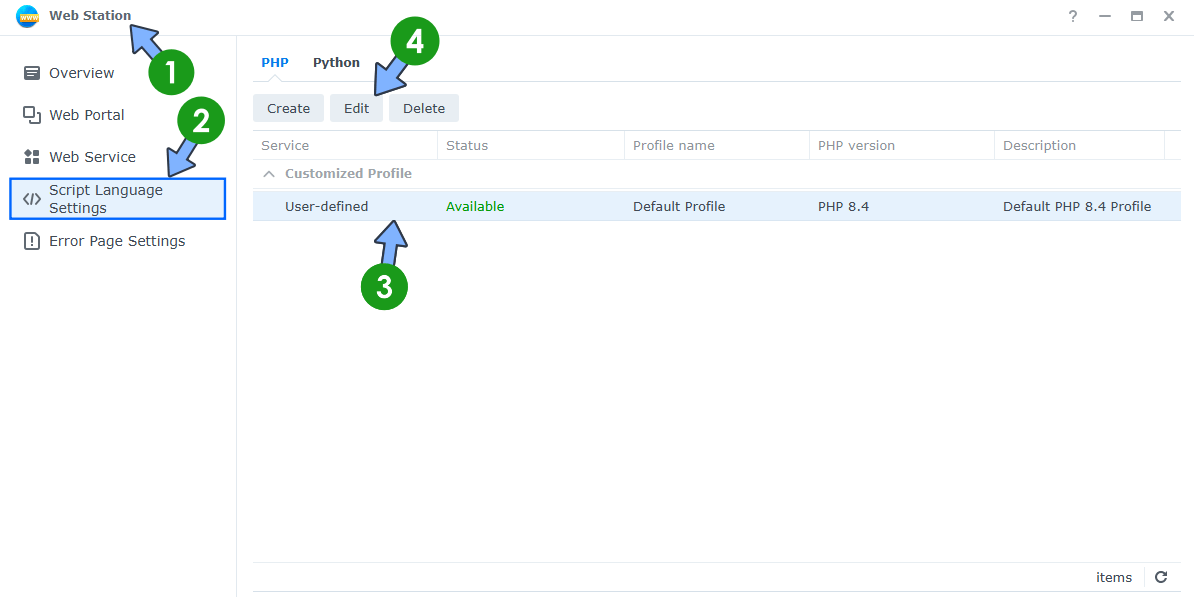
Disable the vulnerable feature in Web Station. Open the Web Station app on your Synology NAS. On the left sidebar, click Script Language Settings. Select your PHP profile. Click the Edit tab. Follow the instructions in the image below. ⚠️Note: The fix will work for PHP 8.4, PHP 8.3, PHP 8.2, PHP 8.1, PHP 8.0, PHP 7.3, PHP 7.2, PHP 7.1, PHP 7.0 and below.
STEP 3
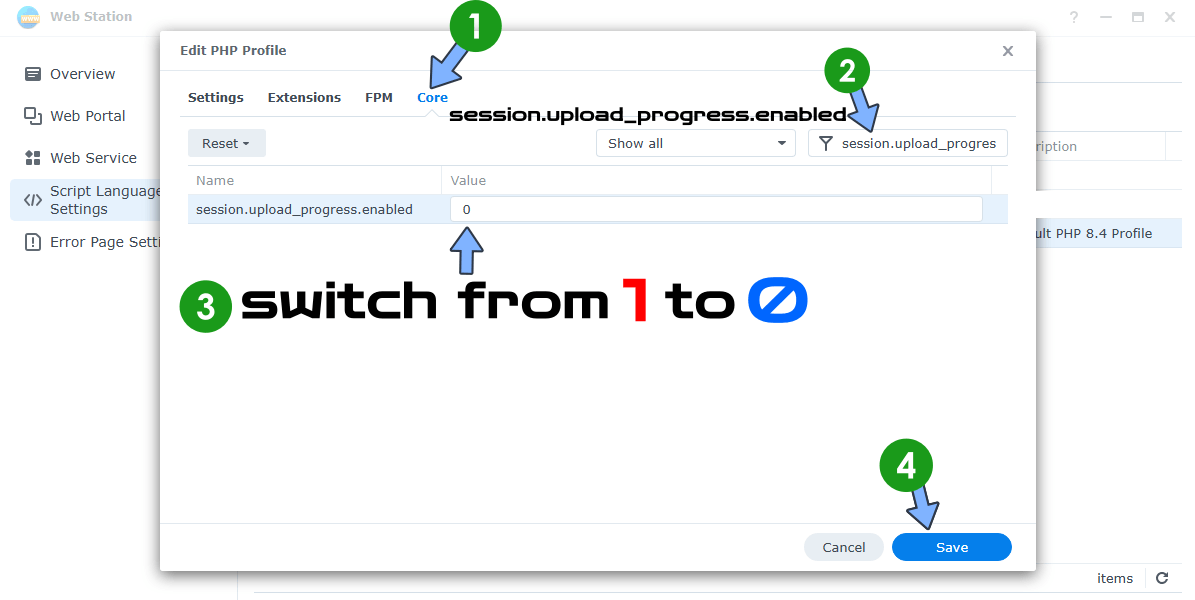
A new pop up window will open. Click the Core tab. Search for session.upload_progress.enabled and change the Value from 1 to 0. Click Save. Follow the instructions in the image below.
STEP 4
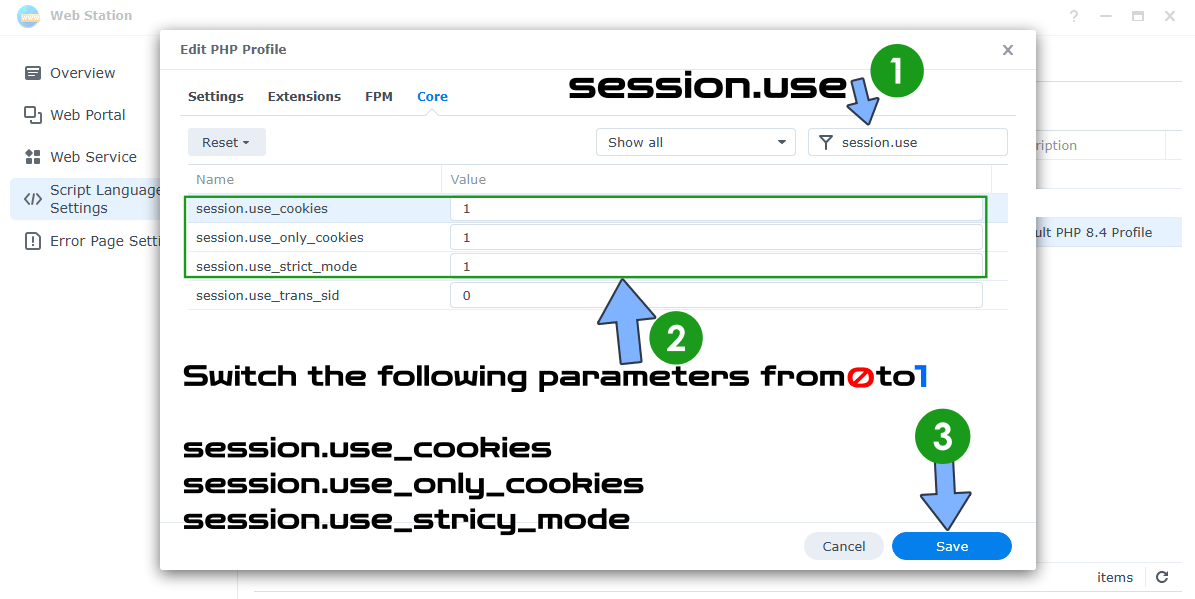
Edit your PHP profile again by following the same exact STEP 2 as before. A new pop up window will open. Click the Core tab. Search for session.use and change the Value from 0 to 1 for the following parameters: session.use_cookies, session.use_only_cookies, session.use_strict_mode
Click Save. Follow the instructions in the image below.
STEP 5
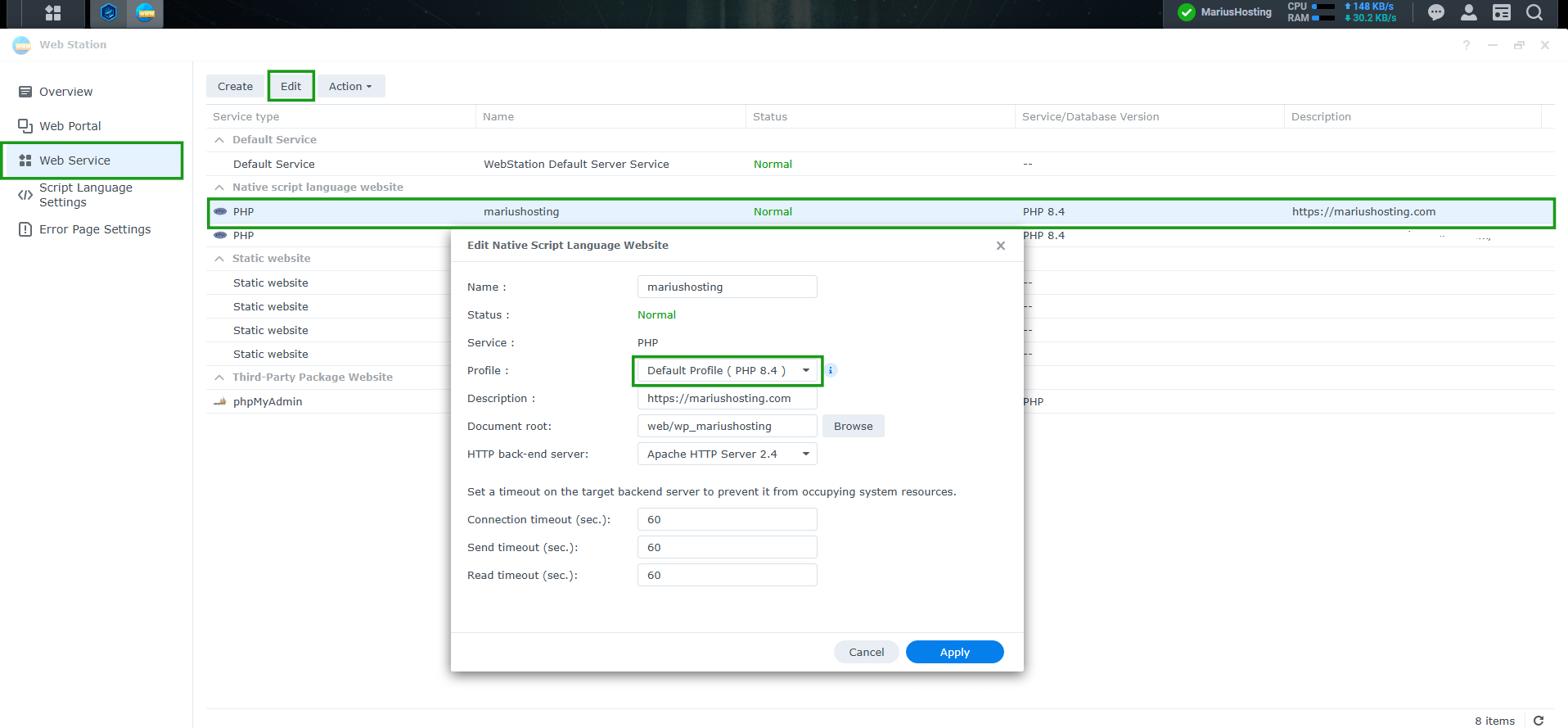
Make sure your website uses your default PHP profile where you changed the php parameters in Web Station / left sidebar Web Service. Follow the instructions in the image below.
Note: Keep an eye on Package Center for updated PHP packages. As soon as Synology releases a version that includes the official PHP security patches (8.2.35 / 8.3.36 / 8.4.27 or newer), install them.
Note: I already sent an email to Synology’s security team. Once they reply, I will update the article. (Synology replied today October 22, 2026 and just say they are working on new packages update.)
💡Extra Information For My Readers
Disabling session.upload_progress.enabled as I explained above, closes one of the most common attack paths (related to CVE-2026-109619), but it is not a complete fix. The PHP team has explicitly stated that there are no complete mitigations: the only safe solution is to update PHP to the patched versions (7.4.33 / 8.0.30 / 8.1.34 / 8.2.35 / 8.3.36 / 8.4.27 / 8.5.12).
The changes recommended in this guide significantly reduce exposure in the short term, but they do not eliminate every possible attack vector. Applying them is still strongly recommended until Synology releases updated PHP packages.
What actually changes?
Normal file uploads (HTML forms, WordPress, Nextcloud, etc.) continue to work normally. You only disable PHP’s native session-based upload progress feature (PHP_SESSION_UPLOAD_PROGRESS). The vast majority of modern applications do not use it.
The settings session.use_cookies, session.use_only_cookies, and session.use_strict_mode are general security best practices and should be kept even after you update PHP.
If I’m not using Web Station, can I ignore this?
Yes, in the vast majority of cases. These vulnerabilities require PHP to process HTTP requests. Without Web Station (or another service that exposes PHP to the web), there is no remote attack surface. If you use my Docker guide for WordPress, you are also safe because the PHP image 8.5.12 is already up to date in Docker as of today, October 21, 2026.
🛡️ Extra Layer of Protection: Threat Prevention + IP Block List
The PHP configuration changes above are the most important steps you can take right now against PHP2Shell. However, they are not the only things that can help.
Threat Prevention (Synology Router)
If you have a Synology router with Threat Prevention enabled, leave it on and make sure it is actively inspecting traffic. Threat Prevention can detect and block some of the malicious patterns used in PHP2Shell scanning and exploitation attempts (especially multipart POSTs with suspicious content). It also gives you alerts so you can see if someone is actively probing your NAS.
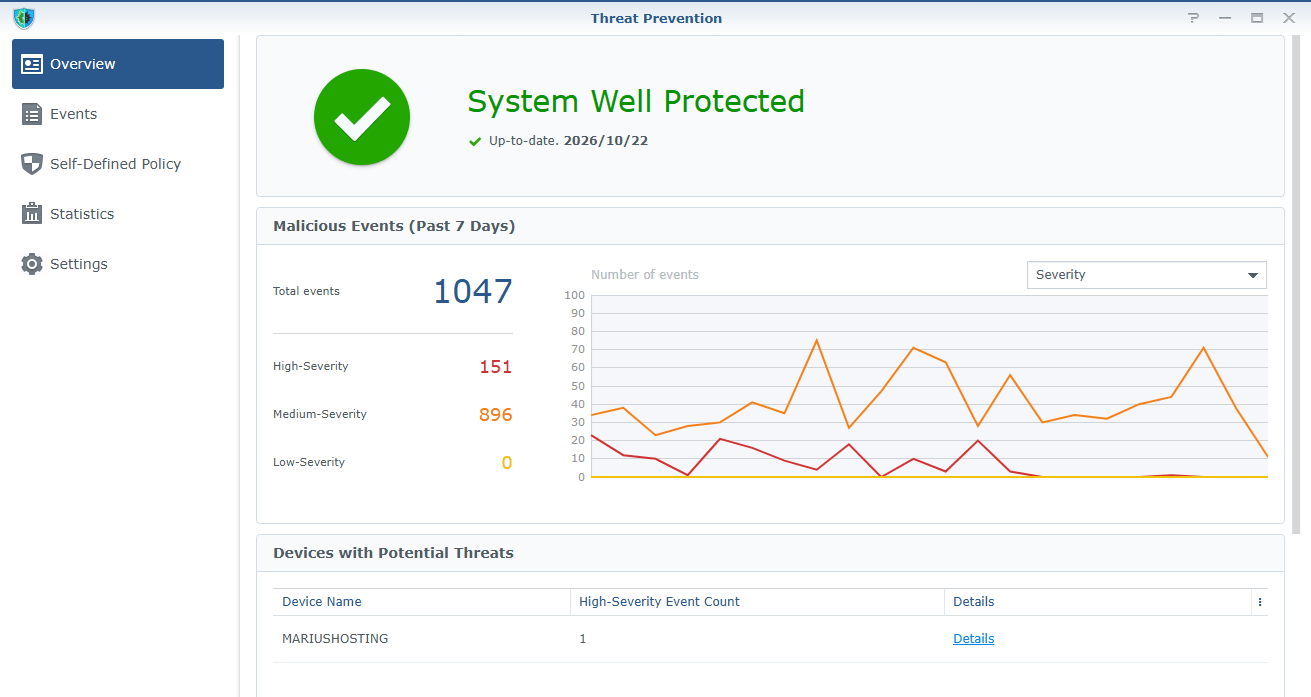
Threat Prevention is useful in this case because it adds a network-level filter in front of your NAS that can detect and block some PHP2Shell exploitation attempts before they reach Web Station. Why it helps specifically against PHP2Shell?
It can catch typical exploit patterns:
PHP2Shell attacks almost always use HTTP POST requests with multipart/form-data and specific characteristics (the PHP_SESSION_UPLOAD_PROGRESS field, suspicious payloads, sequences that trigger PHP crashes or memory exhaustion, etc.).
Threat Prevention (based on an IDS/IPS engine similar to Suricata) can recognize these patterns and block or alert on them. It reduces automated scanning. Right now, there are many scanners and bots mass-probing for this vulnerability. Threat Prevention helps stop a portion of that traffic already at the router, so fewer malicious requests reach the NAS. It also gives you visibility even when it doesn’t block everything, it generates alerts. This lets you see if someone is actively targeting your site and take further action (for example, manually blocking the IP or checking the NAS logs).
🛡️IP Block List
I also maintain a regularly updated IP Block List that you can import into your Synology NAS or Synology Router: ➡️ https://mariushosting.com/ip-block-list/
It contains tens of thousands of known malicious IPs. Importing it (and setting the expiration to Forever) reduces the volume of automated scanners and opportunistic attackers that even reach your Web Station.
Important: The IP Block List and Threat Prevention are supporting layers. They do not replace the PHP mitigations described in this guide, and they do not fully fix the underlying vulnerability. They simply make life harder for random attackers while you wait for Synology to release the patched PHP packages.
Recommended combination right now:
- Apply the PHP profile changes from the beginning of this guide in Web Station.
- Keep Threat Prevention enabled on your Synology router (if you own one).
- Import the latest IP Block List.
Together, they raise the bar significantly until the official PHP update arrives.
This post was updated on Friday / October 23rd, 2026 at 6:18 PM