

Hey, everyone! Today, October 23, 2026, PHP published a new informational advisory about CVE-2026-115560, a separate remote code execution vector related to the session.upload_progress feature. This is not a bypass of the PHP2Shell patches (CVE-2026-109618 and CVE-2026-109619) released on October 21, 2026. It is a different issue that only affects a very specific and uncommon configuration. PHP considers the real-world risk low and is not issuing an emergency update. A proper fix will arrive with the next regular bugfix release.
👌Good News for MariusHosting Readers
If you already followed the mitigation I recommended in my previous article, you are already covered. In the guide Synology: Mitigating PHP2Shell (CVE-2026-109618 / CVE-2026-109619), I explicitly advised setting session.upload_progress.enabled to 0 in your Web Station PHP profiles. PHP’s new advisory confirms that this exact setting is the recommended protection against CVE-2026-115560 as well. No additional steps are required.
💡Why This Matters
The new vulnerability only becomes exploitable under a rare combination of conditions:
session.serialize_handler is set to php_binary or php_serialize, and the application switches it to php at runtime with ini_set() before calling session_start(), and
session.upload_progress.enabled is still enabled. Because this setup is uncommon, PHP is handling it in the normal release cycle. In the meantime, keeping session.upload_progress.enabled disabled fully mitigates the vector.
🎯What You Should Do
If you already disabled session.upload_progress.enabled following my previous instructions, you are protected. Leave the setting as it is. If you have not applied it yet, follow the instructions below.
STEP 1
Please Support My work by Making a Donation.
STEP 2
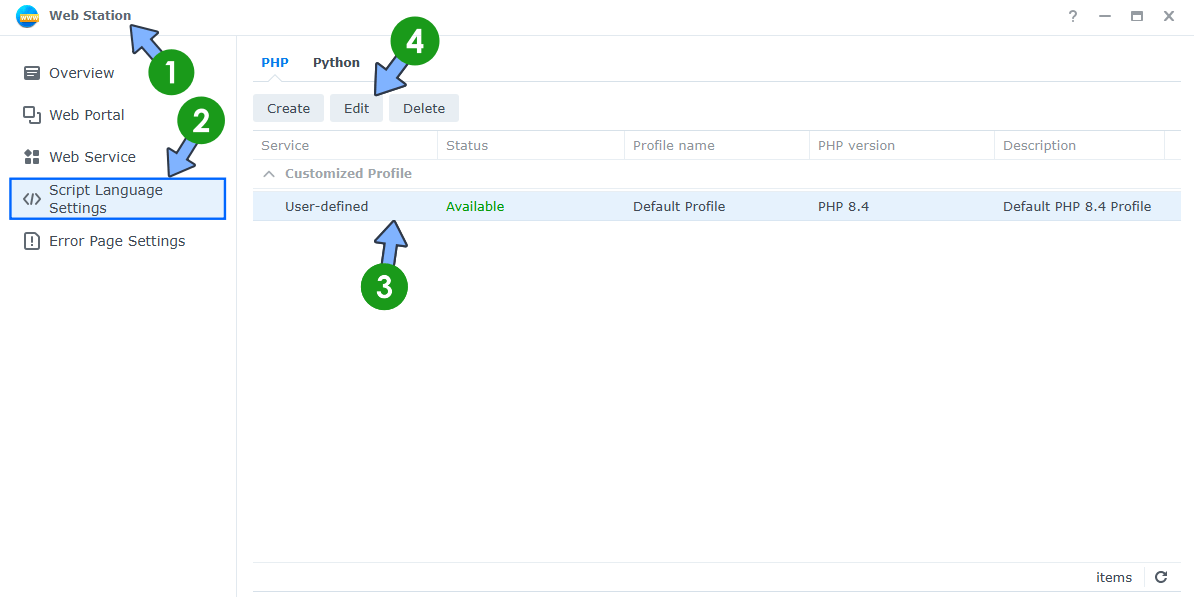
Disable the vulnerable feature in Web Station. Open the Web Station app on your Synology NAS. On the left sidebar, click Script Language Settings. Select your PHP profile. Click the Edit tab. Follow the instructions in the image below. ⚠️Note: The fix will work for PHP 8.4, PHP 8.3, PHP 8.2, PHP 8.1, PHP 8.0, PHP 7.3, PHP 7.2, PHP 7.1, PHP 7.0 and below.
STEP 3
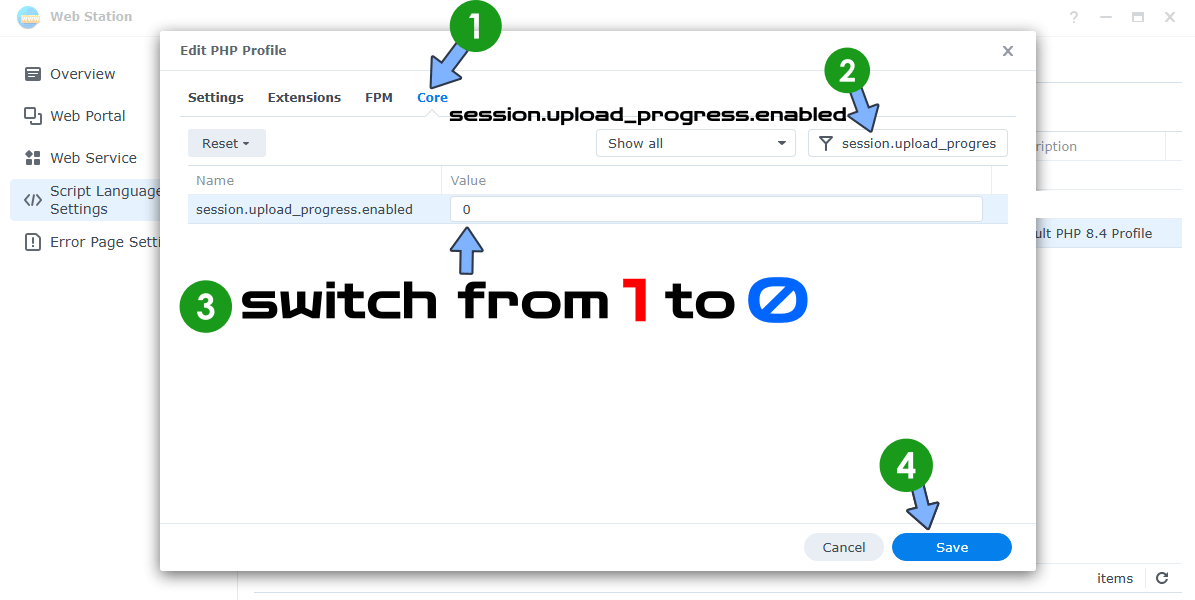
A new pop up window will open. Click the Core tab. Search for session.upload_progress.enabled and change the Value from 1 to 0. Click Save. Follow the instructions in the image below.
STEP 4
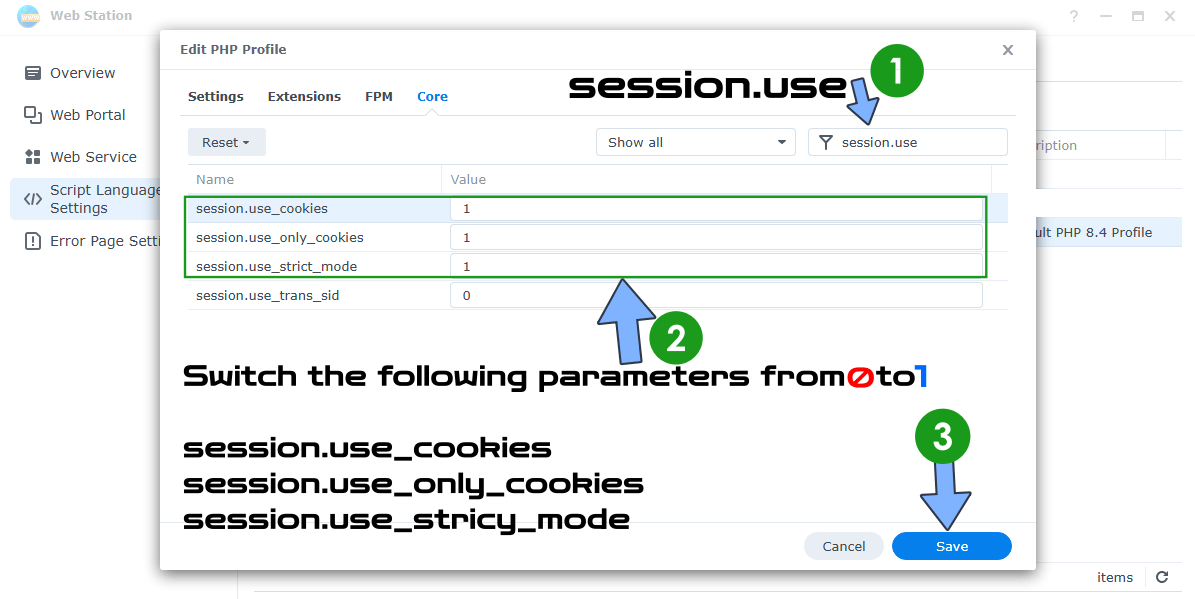
Edit your PHP profile again by following the same exact STEP 2 as before. A new pop up window will open. Click the Core tab. Search for session.use and change the Value from 0 to 1 for the following parameters: session.use_cookies, session.use_only_cookies, session.use_strict_mode
Click Save. Follow the instructions in the image below.
STEP 5
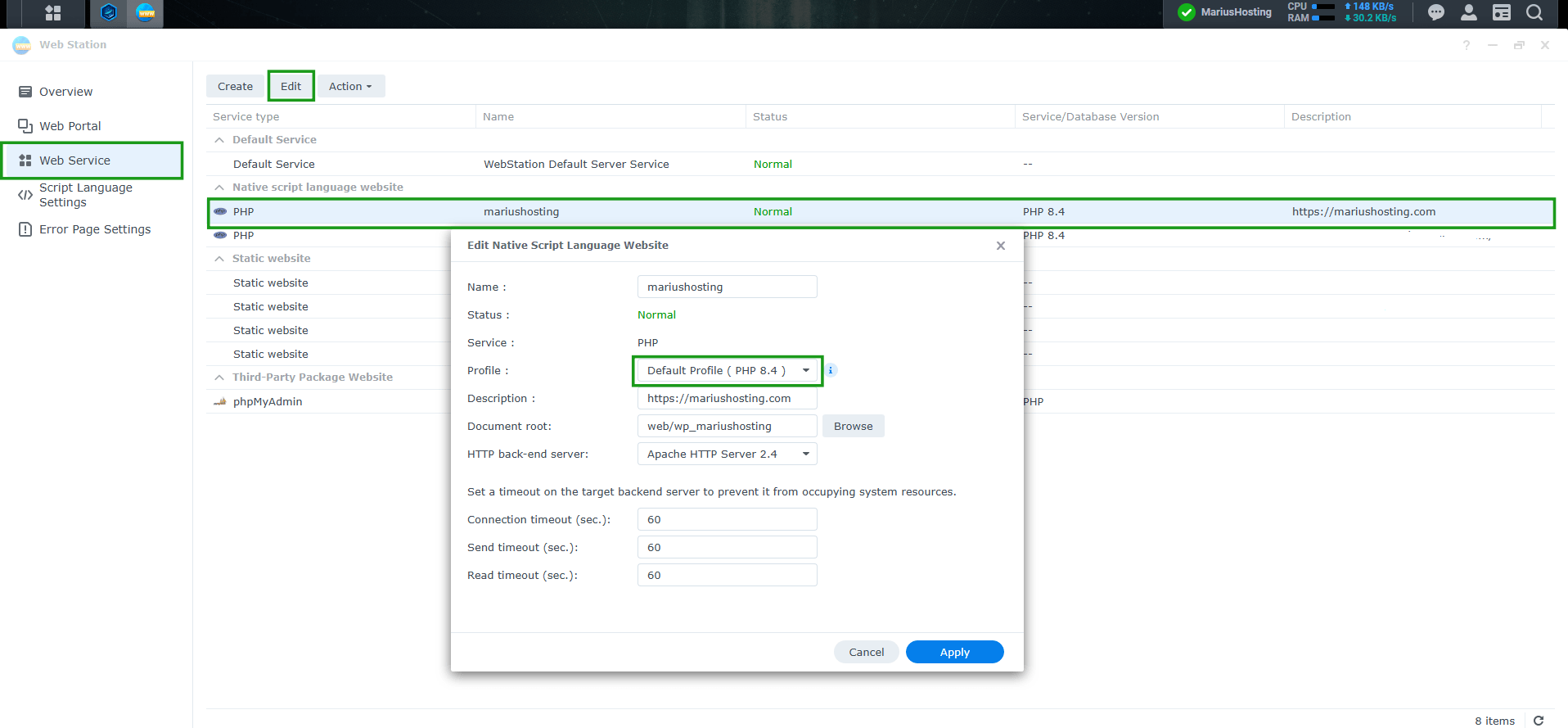
Make sure your website uses your default PHP profile where you changed the php parameters in Web Station / left sidebar Web Service. Follow the instructions in the image below.
Note: Continue using the updated Synology PHP packages for the original PHP2Shell vulnerabilities. Those packages do not address CVE-2026-115560, which is why the mitigations above remain important.
Available patched packages.
PHP 7.4.33 (package 7.4.33-0131)
PHP 8.0.30 (package 8.0.30-0122)
PHP 8.1.34 (package 8.1.34-0120)
PHP 8.2.35 (package 8.2.35-0171)
PHP 8.3.36 (package 8.3.36-0051)
PHP 8.4.27 (package 8.4.27-0051)
📦How to update: Download the new PHP package from the list above. Open Package Center on your Synology NAS. Click Manual Install then upload the new version.
Final Note: Once again, readers who applied the practical mitigation I published on MariusHosting on October 21, 2026 were already in a safe position before the new advisory appeared. The same simple change that reduced exposure during the original PHP2Shell window also covers this new vector. That’s the kind of practical, independent coverage I aim to deliver here on my blog. No sponsors, no corporate influence, just clear steps when they matter most. Stay safe, keep your NAS updated, and I’ll continue monitoring the situation and update you as soon as Synology or PHP releases anything new. Your internet friend, Marius.
This post was updated on Friday / October 23rd, 2026 at 6:32 PM