

First of all, the usual disclaimer: this is still the same no-fluff roundup. Real updates, tested where possible, written for people running Synology, UGREEN, Asustor and plain Docker on home NAS boxes. A small note about the Roundup schedule. The Roundups will be posted twice a month: one in the middle of the month and one at the end. From 2027 they will be posted weekly. This way I have a bit more time to test properly instead of rushing.
🌰October Started Strong: Immich and Machine Learning V2
Immich has been updated and now, if you want to take full advantage of the improvements, you need to add Machine Learning V2 in the compose. What does this Learning V2 do? the environment variable MACHINE_LEARNING_MODEL_REVISION=v2 brings massive performance optimizations to the self-hosted photo platform. The optimized format consumes less RAM and system resources. This makes running full AI capabilities far more forgiving on resource-constrained homelab hardware, like low-power Synology NAS setups.
For Synology:
In my Immich guide for Synology, open the immich compose (in Dockhand or Portainer). In Portainer, left sidebar, click Stacks. Click on the immich instance. Editor tab. In Dockhand, left sidebar, click Stacks. Click on the immich instance. In the immich-machine-learning: service add the following environment variable:
- MACHINE_LEARNING_MODEL_REVISION=v2
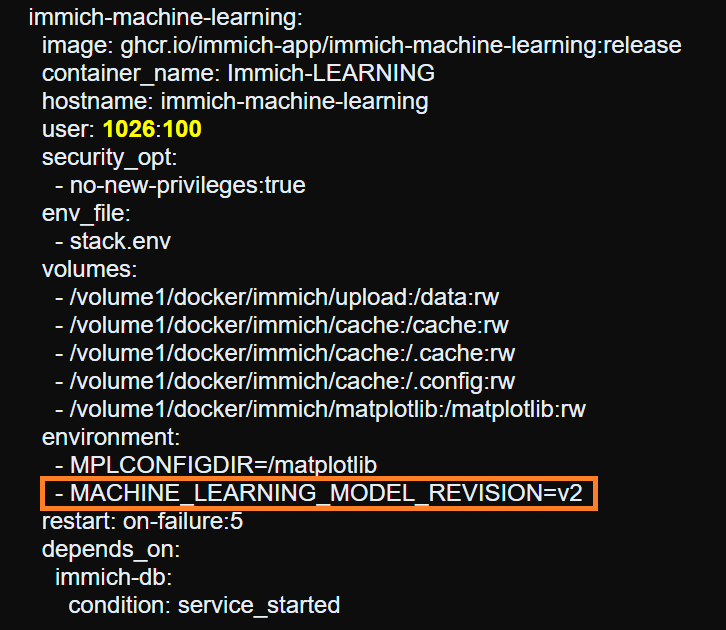
After you have added the new environment variable in your immich stack, click Update the stack in Portainer or Save and Redeploy in Dockhand.
For UGREEN:
In my Immich guide for UGREEN, open the immich compose (in Dockhand or Portainer). In Portainer, left sidebar, click Stacks. Click on the immich instance. Editor tab. In Dockhand, left sidebar, click Stacks. Click on the immich instance. In the immich-machine-learning: service add the following environment variable:
- MACHINE_LEARNING_MODEL_REVISION=v2
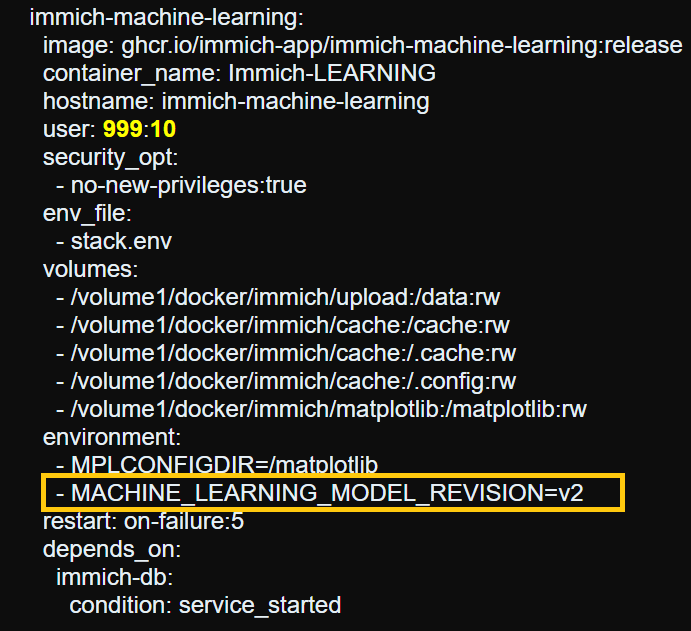
After you have added the new environment variable in your immich stack, click Update the stack in Portainer or Save and Redeploy in Dockhand.
For UGREEN with GPU Acceleration:
In my Immich guide for UGREEN with GPU Acceleration, open the immich compose (in Dockhand or Portainer). In Portainer, left sidebar, click Stacks. Click on the immich instance. Editor tab. In Dockhand, left sidebar, click Stacks. Click on the immich instance. In the immich-machine-learning service add the following environment variable:
MACHINE_LEARNING_MODEL_REVISION: v2
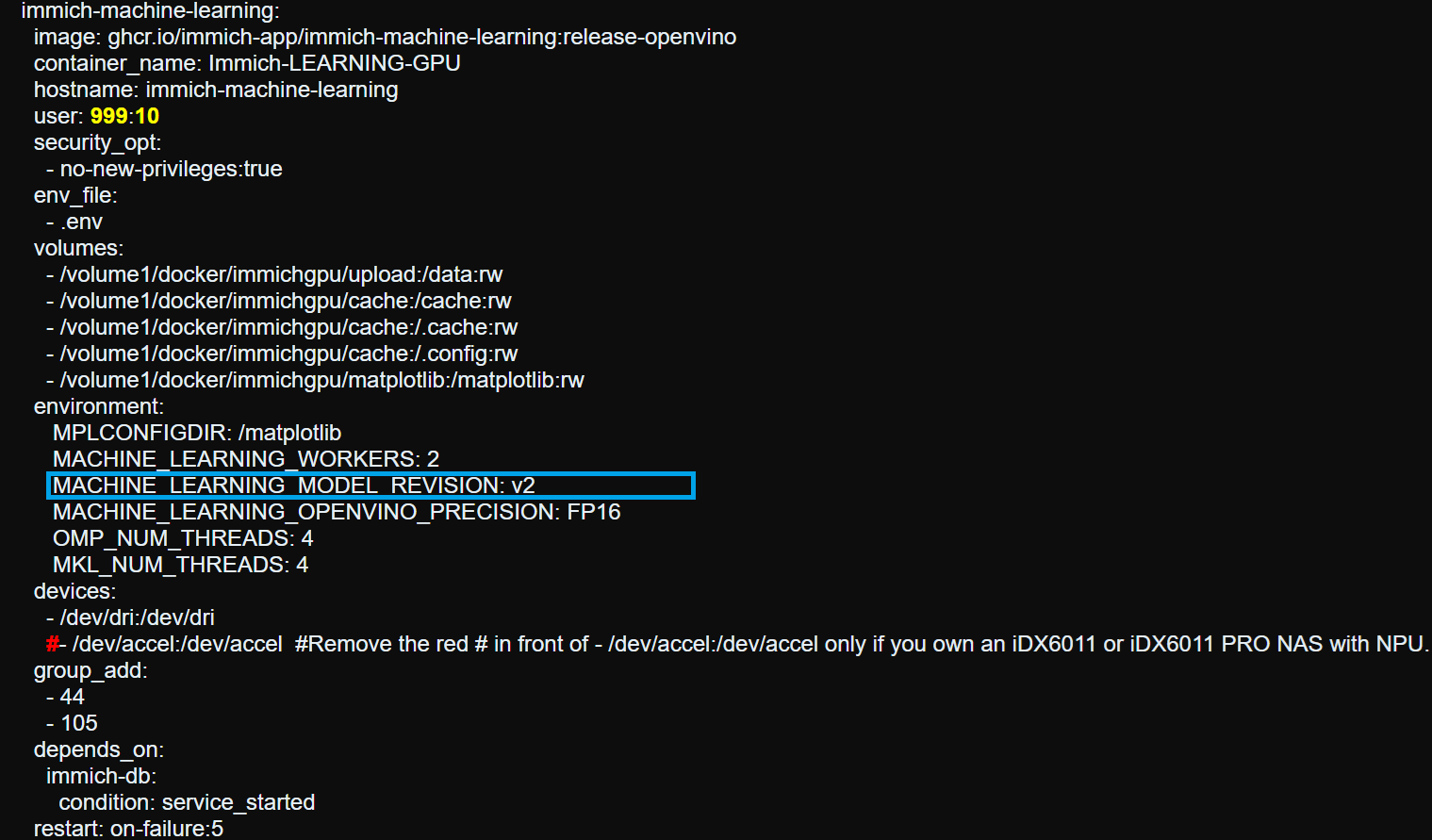
After you have added the new environment variable in your immich stack, click Update the stack in Portainer or Save and Redeploy in Dockhand.
📰The Latest DSM From Synology
DSM 7.4.1-90080 Update 1 is out. It is marked as an “Important Update” and fixes security vulnerabilities. The problem is that Synology did not release a real changelog: the notes just say “Fixed security vulnerabilities”. No CVEs, no details. Their policy is not to publish details until the patch is ready, but even afterwards they stay very vague. Better update anyway, especially if your NAS is exposed.
💰Ugreen and The New “NAS” Devices on Kickstarter
Ugreen is launching new devices on Kickstarter (HomeAgent and similar). They are not really classic NAS units: they are more AI smart-home hubs with storage, NVR and a local assistant. To me, they honestly look like an Airfryer. I have my doubts. The prices are exorbitant and, in my opinion, they are not worth it at all. Almost $10,000 for the most powerful model in the range? Are we joking? For that money you can buy a proper NAS, a decent computer and still have a lot of money left over. I just don’t see the point. On top of that, Ugreen keeps ignoring my collaboration emails. For me it is clear they do not want to collaborate, perhaps because I always say things as they are.
🎯Portainer Unfollowed me on X
After my Reddit post (Hey Portainer, Dockhand is my new home) and the article How to Move Your Docker Containers From Portainer to Dockhand, Portainer unfollowed me after 4 years. Basically they no longer follow Marius… but now we follow Dockhand, right?
🔐Let’s Encrypt And Certificates That Last Less and Less
Let’s Encrypt is shortening the certificates that we all use on Synology, UGREEN and in general. Starting February 10, 2027, the default drops from 90 days to 64 days. They are not revoking existing certificates: the last 90-day one is expected to expire around May 11, 2027.
From February 16, 2028, it drops further to 45 days.The reason is straightforward: shorter certificates limit the damage from a compromised key or mis-issuance and push everyone toward full ACME automation. If you already use a client that supports ARI (ACME Renewal Info), you almost don’t need to do anything. Let’s Encrypt will tell your client when to renew. If you have scripts or cron jobs with fixed dates (like “renew 30 days before expiry”), update them to roughly two-thirds of the certificate lifetime. Let’s Encrypt’s staging environment has already started issuing 64-day certificates (from October 14, 2026), so you can test. The authorization reuse period is also shrinking (from 30 days to 10 days, then to 7 hours in 2028). In practice: more automation, fewer surprises ahead. This will be the next industry-scale standard. It won’t just affect Let’s Encrypt certificates, but all of them.
🛠️The Site Tools Are Now Clean and Local
To avoid external tool services, my guides now use Tools written in HTML. I wanted to publish them last year, but I had to update hundreds of articles first. Now it is done: all articles are updated and the key/token generation tools work without any external services. Privacy is extremely high because everything happens client-side in the browser: the values are generated on your device and never leave your computer. No accounts, no tracking, no ADS, no paywall. Among the tools there is also the one I use every day when preparing the guides: the Task Scheduler / docker run to Docker Compose converter. You paste the docker run command (or the one from Synology’s Task Scheduler) and it instantly generates a clean Compose stack, ready to paste into Dockhand or Portainer. No more manual conversions, no syntax errors. Exactly the practical style I use in my guides.
🔧The Blog Menu Now Has New Icons
I redid the mariushosting menu with new icons. The old ones looked a bit outdated. Now I use the public Font Awesome registry. I chose them carefully and I also updated the internal pages. It took two weeks of work in a row, but I like the result better.
✨Dockhand Takes The Experience to Another Level
Recently Dockhand allows you to add tags and icons to containers. The experience on the NAS becomes totally different: more organized, clearer and nicer to use every day. Follow my guide below on how to make your Docker environment look amazing. Also, the upcoming Dockhand version 1.0.54 will include language packages for German, Polish, Chinese and French.
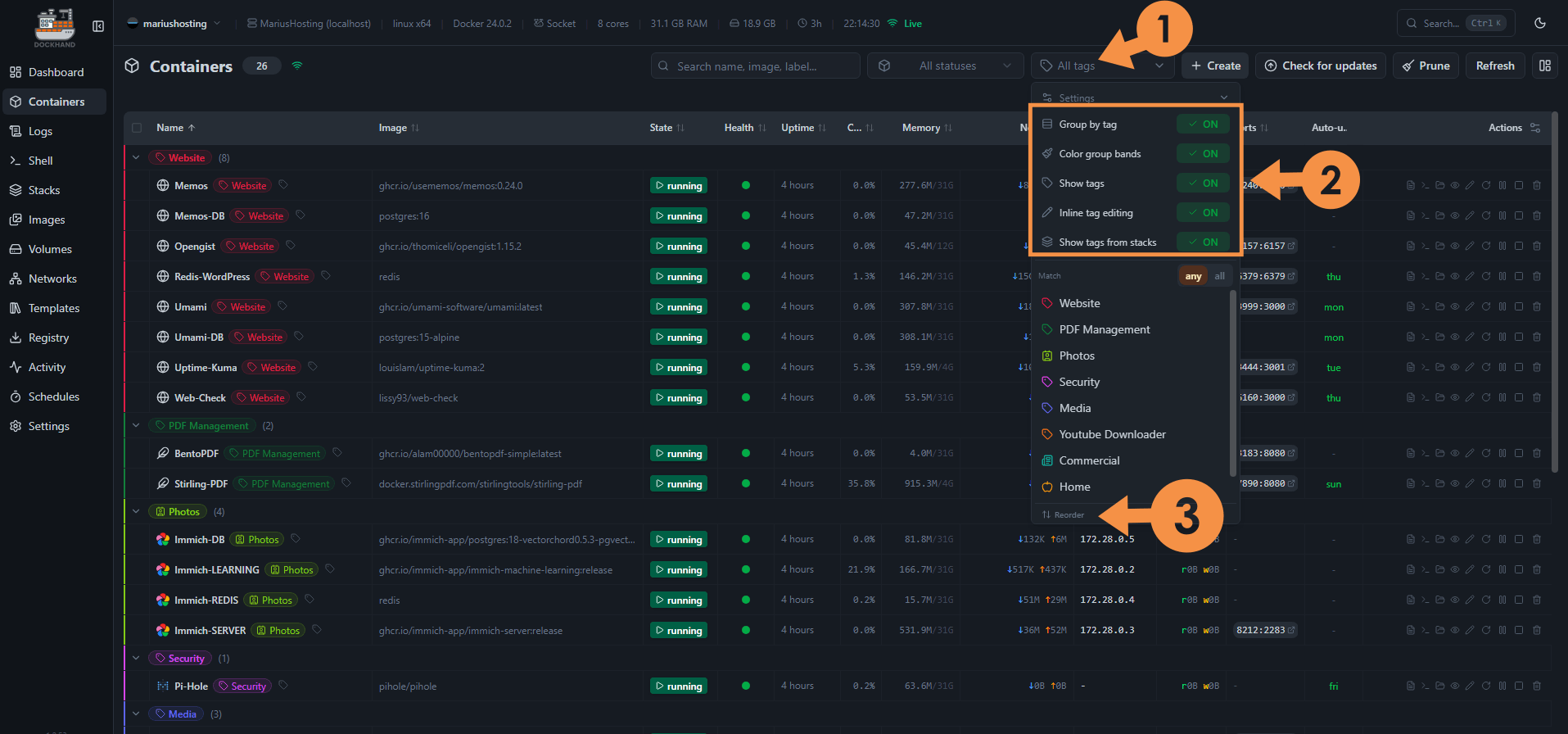
Open Dockhand. On the left sidebar, click Containers. You will see a tag icon after the container. Click on it to add your first tag.
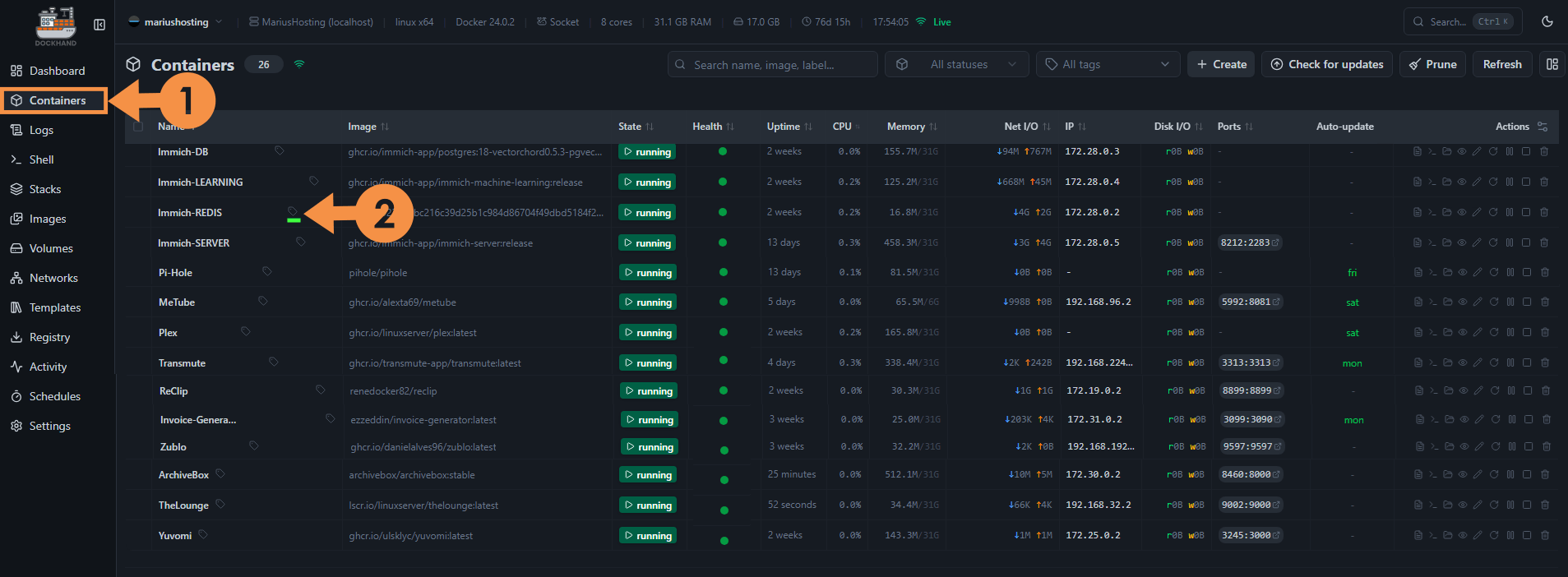
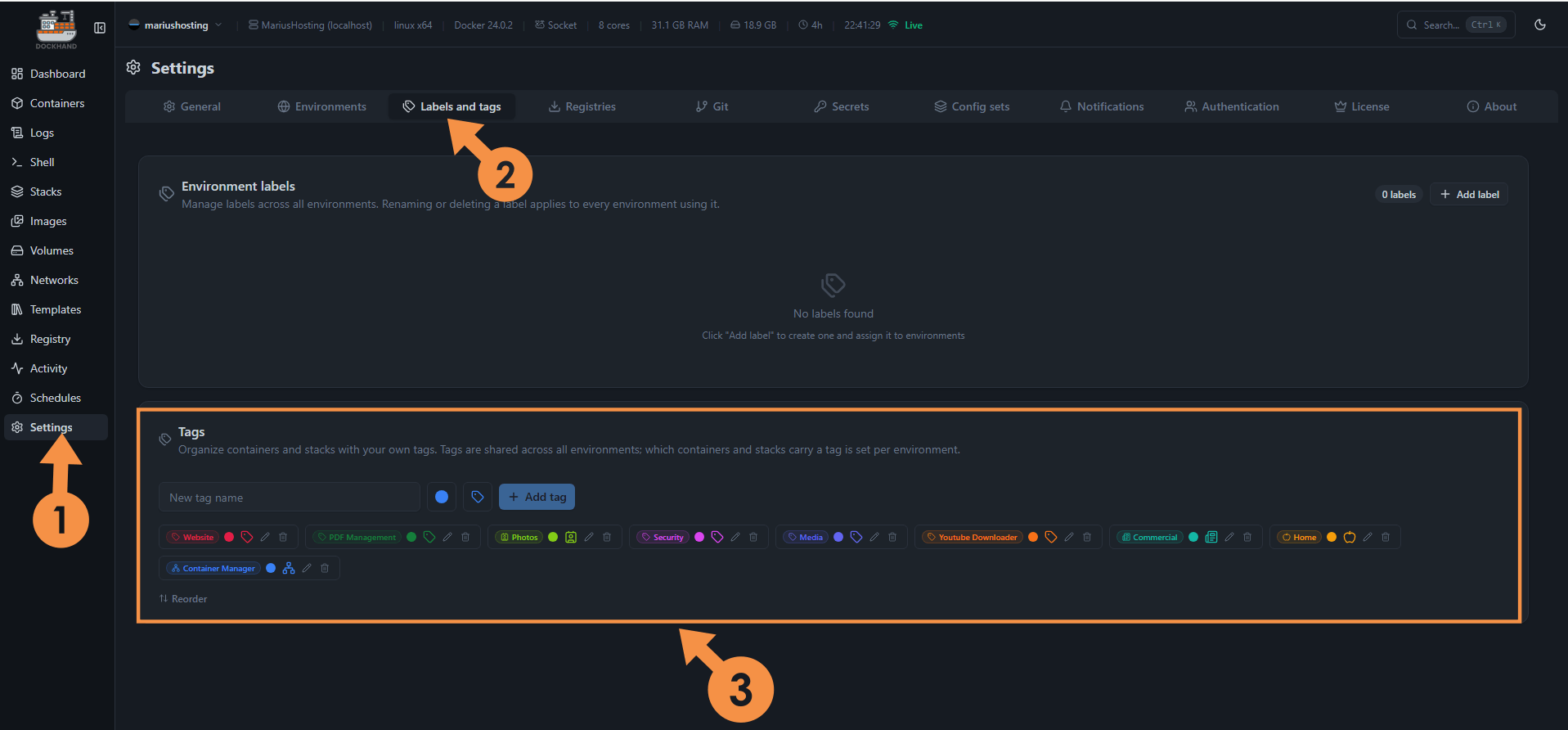
At the top of the page, you can click All tags and you will be able to activate a series of options to better manage your tags. You can also easily reorder the tags as per point 3 below.
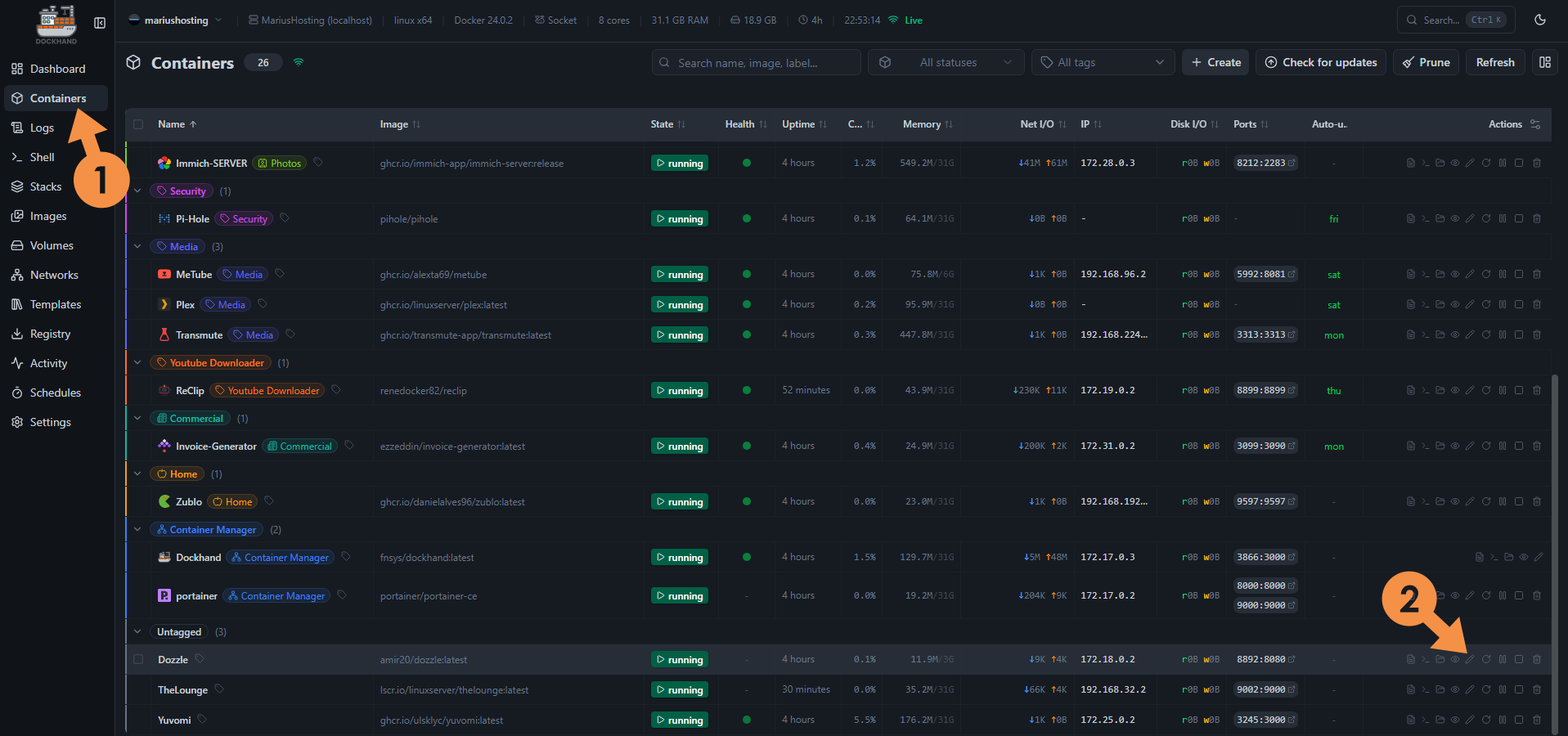
Steps to add icons to containers. Choose a Container from your list on the right side, click on the little pencil icon. Follow the instructions in the image below.
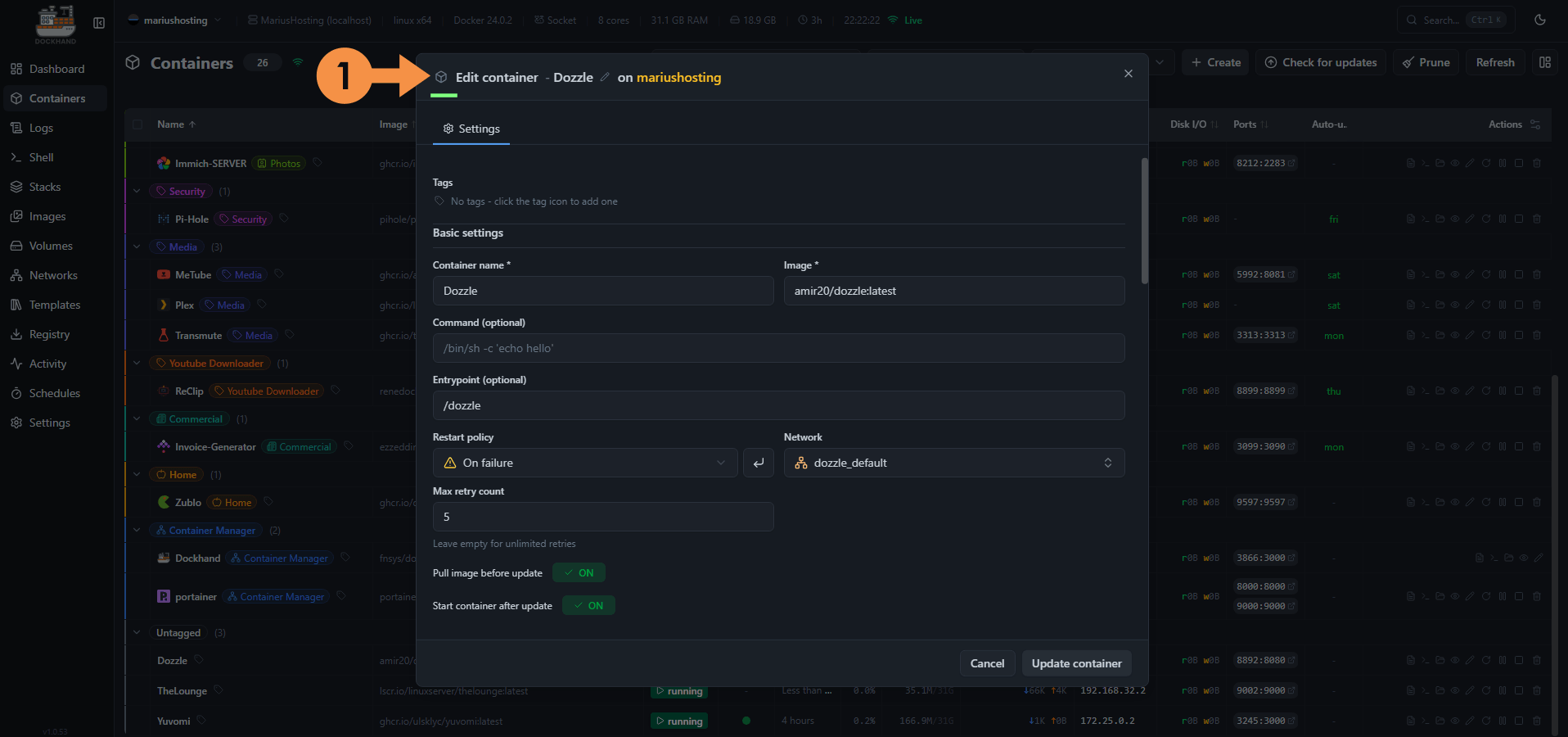
A new pop up window will open. Click the little icon on the left. Follow the instructions in the image below.
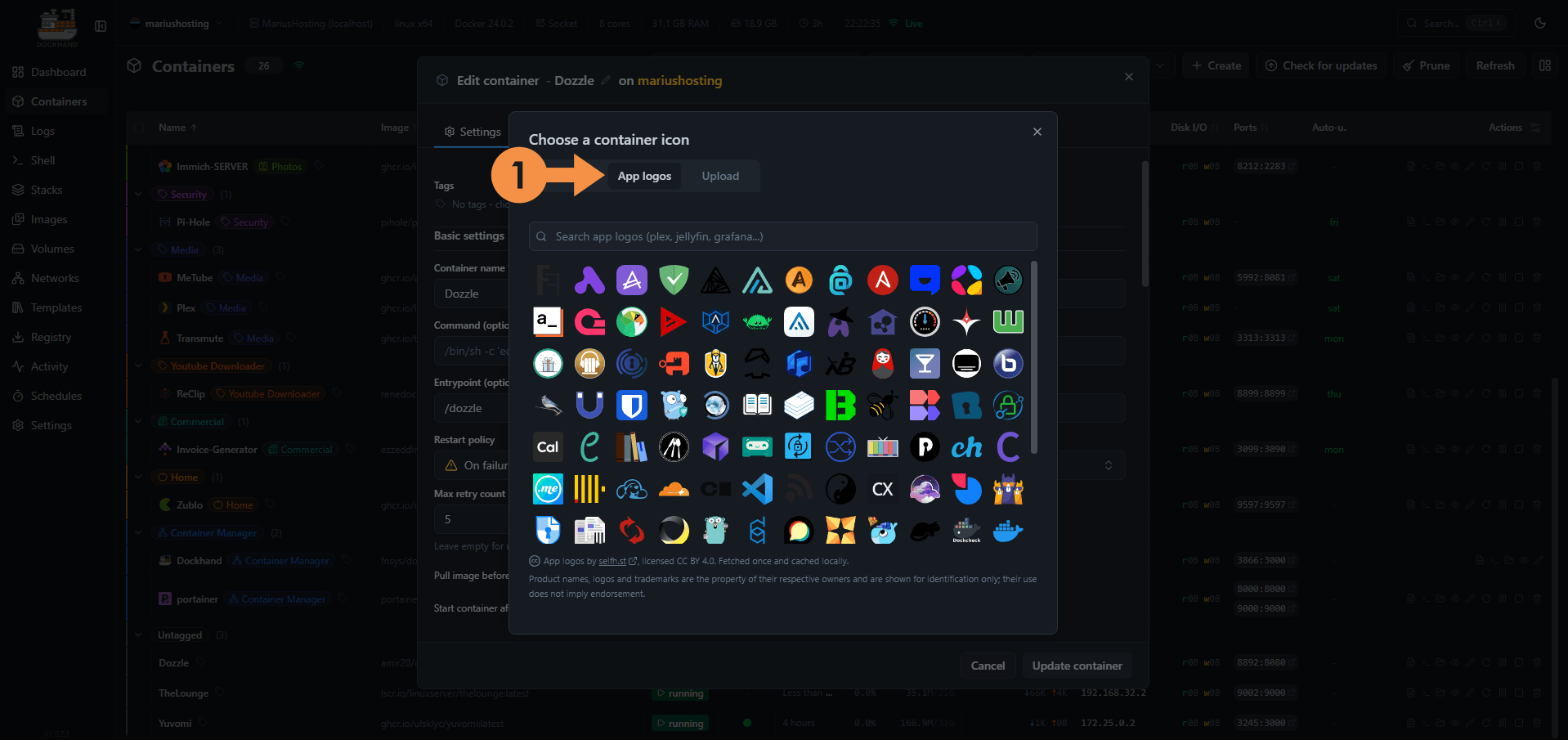
Click App logos. Follow the instructions in the image below.
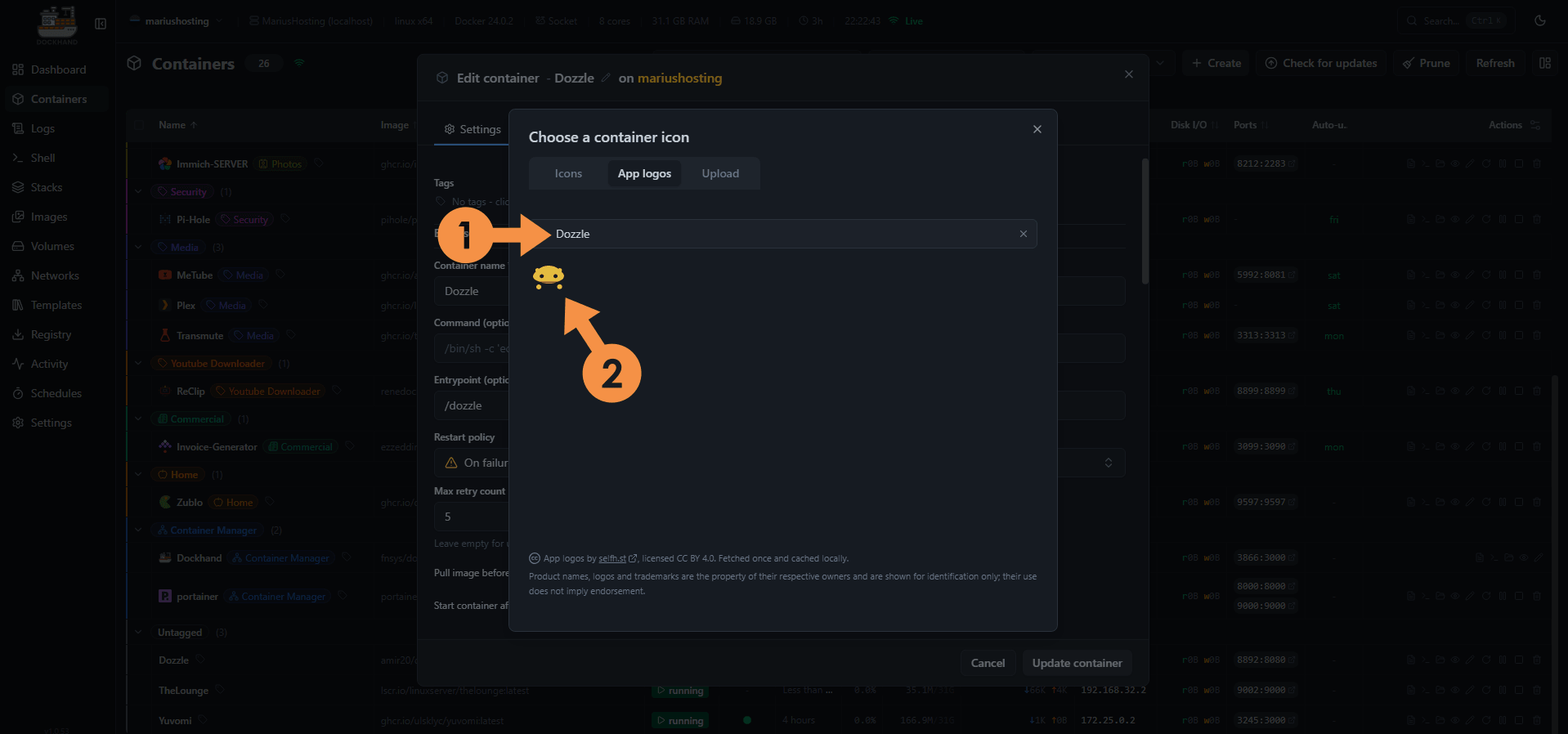
Search for an icon. For example, Dozzle. Click on the icon. Follow the instructions in the image below.
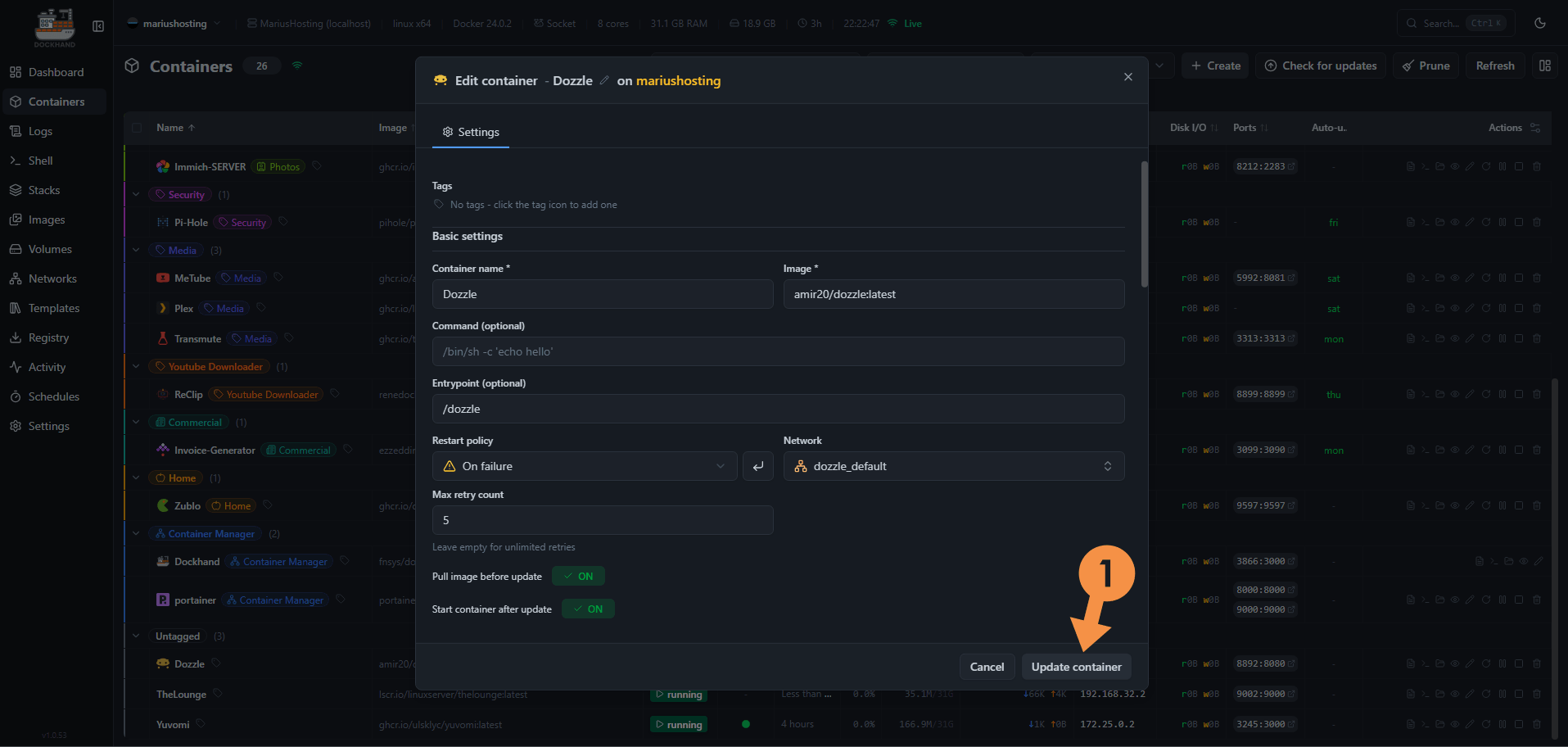
Click Update Container. Follow the instructions in the image below.
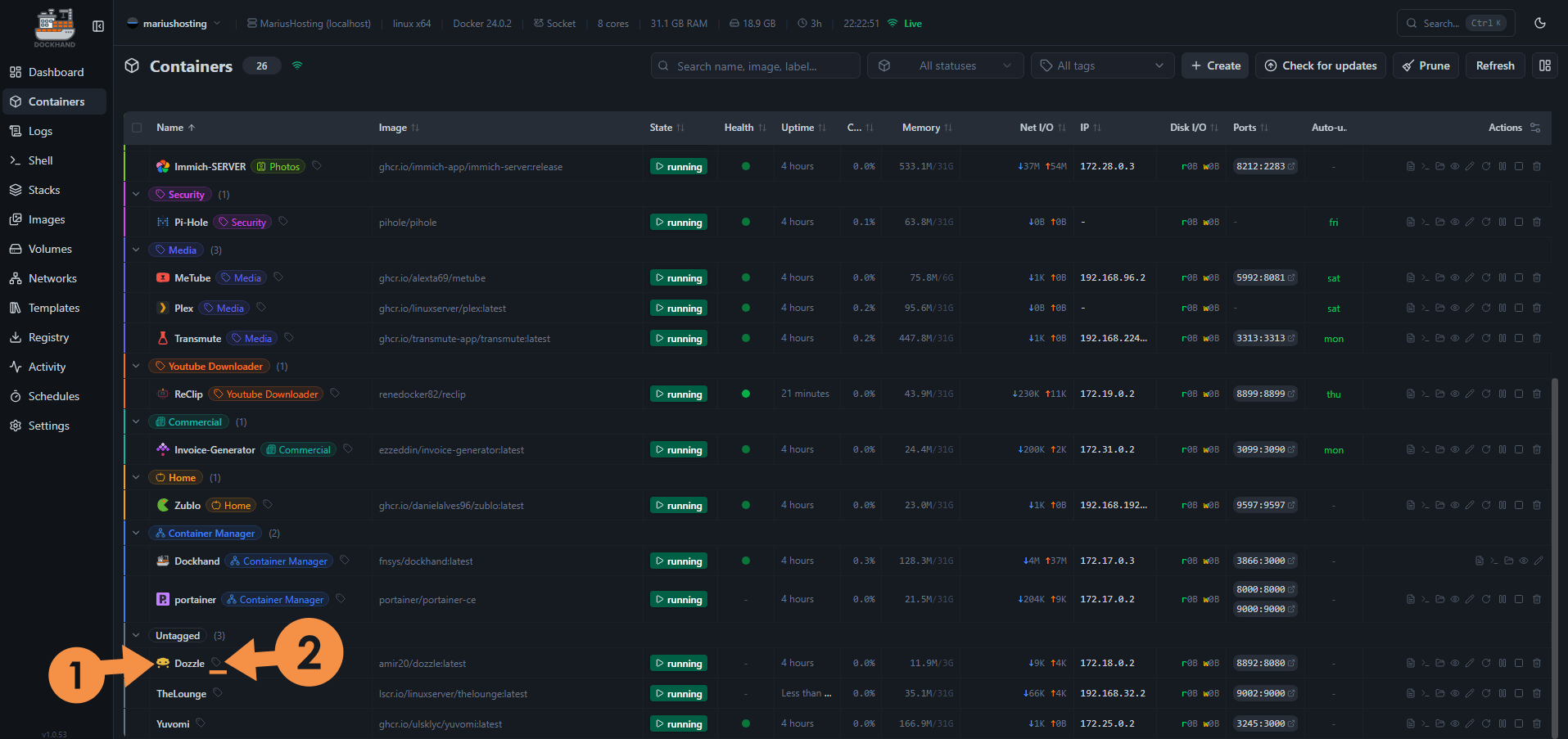
Your icon at a glance! You can now add your tag.
How to manage your tags in Dockhand? On the left sidebar, click Settings. Click the Labels and tags tab. In this area you can organize tags, remove them, rename them etc. Follow the instructions in the image below.
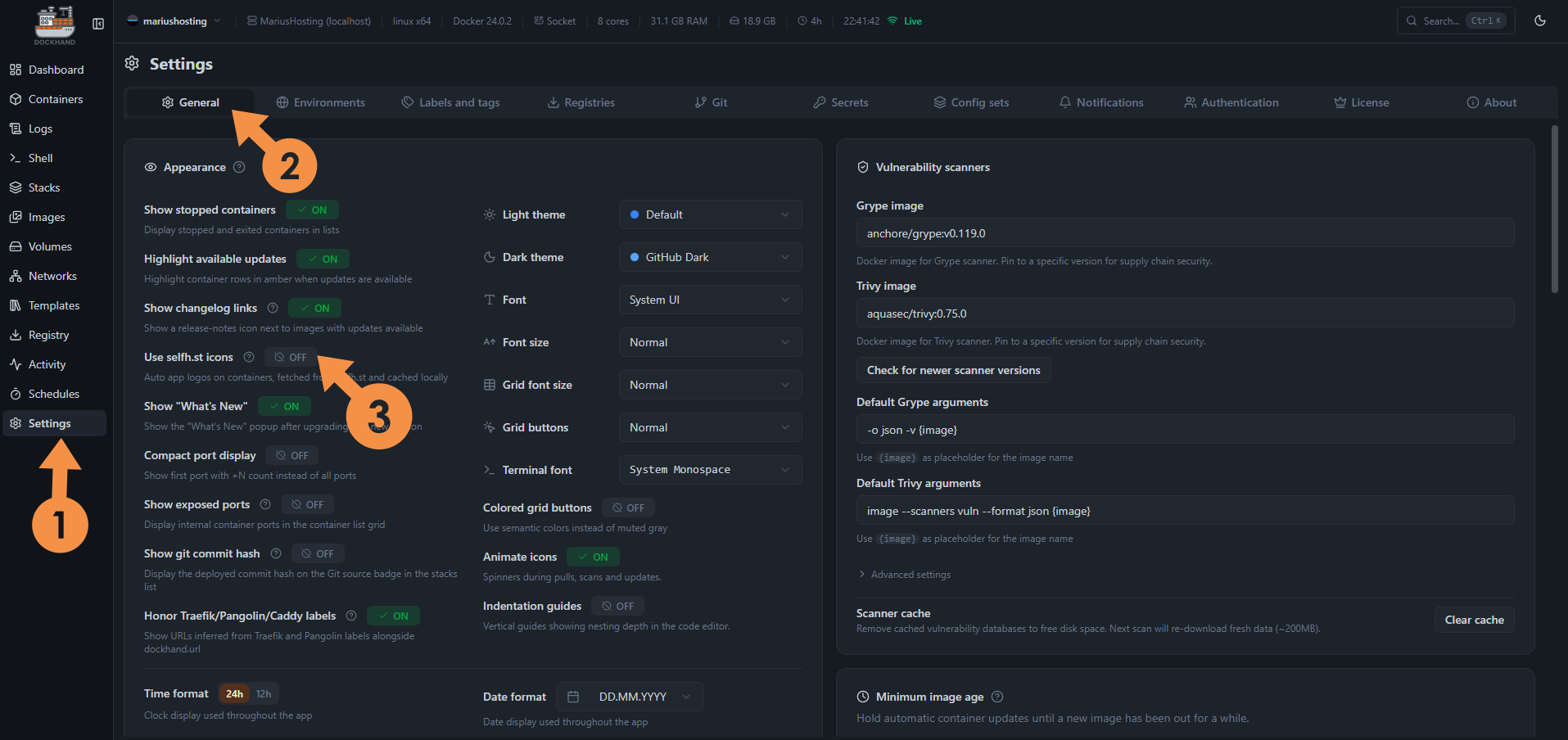
You can also activate the icons automatically in Settings / General tab. Switch the selfh.st icons to ON. I prefer to switch this option to OFF because, when it’s OFF, I can select the same icon, for example, the immich icon for all my IMMICH containers, db, redis, machine learning etc, one by one.
PS: You can also add tags and icons on your Stacks area, not only in the Containers area.
📑Content Also For Asustor
I started making guides for Asustor as well because many of you asked for them. It is not easy for me: I do all the images and screenshots by hand, and the tests are done on real hardware. I test everything carefully to make sure it actually works before publishing.
🚨To Certain YouTubers: Stop Copying
I urge some YouTubers to stop copying my content. In recent months (and I’m not naming names) I’ve seen several videos where they take my Compose files word for word, use my exact same ports, and make installation tutorials that basically follow my guide step by step. I don’t make YouTube guides because the guides change often, there are breaking changes, and I prefer to update the written text when needed. Seeing people who just want a bit of fame copying like that, without adding anything of their own, is very sad. If you point it out, many delete the messages, few apologize. It’s not ethical, especially because they take the work from a blog that has no ads and no affiliate links for product sales.
🪐World Space Week Just Ended
World Space Week recently concluded. For this reason, I’m making two audio clips available that you absolutely must listen to to feel at home again. I always get goosebumps and feel so emotional whenever I listen to these audios.
The first is Carl Sagan’s Pale Blue Dot, 1994. “Look again at that dot. That’s here. That’s home. That’s us. On it everyone you love, everyone you know, everyone you ever heard of, every human being who ever was, lived out their lives. The aggregate of our joy and suffering, thousands of confident religions, ideologies, and economic doctrines, every hunter and forager, every hero and coward, every creator and destroyer of civilization, every king and peasant, every young couple in love, every mother and father, hopeful child, inventor and explorer, every teacher of morals, every corrupt politician, every ‘superstar,’ every ‘supreme leader,’ every saint and sinner in the history of our species lived there on a mote of dust suspended in a sunbeam.”
The second audio is from Neil Armstrong’s “one small step for man, one giant leap for mankind.”
ℹ️A Small Personal Update
I caught the flu after going to the supermarket. I go out very little, maybe once a month for groceries, and it happened that I got sick right when I went out. As always, we keep going. I turned 42: my mind is still very young, but the body is starting to feel its age. Thank you to those who support the blog. I want to keep this blog alive. The guides, the real-hardware tests, the updated compose files, the tools and these roundups really help you a lot in your homelab every single day. So far only 7 people have supported the work since the last September Roundup. If more of you donated, I could dedicate myself even more: more guides, more testing, more updates, more time for you. There is a crisis, inflation is sky-high where I live (Romania) and in the rest of the world, the economy is not going well, the EURO has risen a lot against the Romanian LEU and gasoline is extremely expensive. This affects everything. If any of these guides have ever saved you hours of frustration or helped make your NAS more useful, Please Support The Work. A Heartfelt thank you to those who already do and to those who decide to do so.

ℹ️Now I Have a Linkedin Profile
Some of you were surprised that I didn’t have a LinkedIn profile. Well, today I created one. You can connect with me!
⚓Mariushosting is An Anchor in a World of AI
Compared to other blogs, I try to put my heart into this site. I see it as an anchor in the world of AI: a lifeline, an anchor of purity and real tests. Behind it, for years, there has always been your Internet friend Marius.
New articles and updated Compose files are already in the pipeline. See you in the next October 30, 2026 Roundup update. Below you will find the most recent guides updated in Mid October 2026.
Immich is a very high performance self-hosted photo and video backup solution directly from your mobile phone. You can run Immich on your Synology NAS and it lets you upload photos and videos from your browser or mobile phone via the dedicated Android Immich app or the iOS Immich app. The Immich user interface feels like Google Photos, especially if you are using the mobile apps. Note: Install Immich on Your Synology NAS.
Paperless-ngx is a document management system that transforms your physical documents into a searchable online archive so you can keep, well, less paper. Note: Install Paperless-NGX on Your Synology NAS.
Dockhand is a modern, self-hosted Docker management platform with an intuitive web interface for homelabs, small businesses, and enterprises. It simplifies container operations, stack deployments, and observability through real-time management (start/stop/restart containers, web terminals, file transfers), a visual Compose editor, GitOps auto-sync, metrics, logs, OIDC/SSO, MFA, vulnerability scans, and multi-host support via the open-source Hawser agent. You can deploy it quickly as a Docker container with no cloud dependencies or telemetry. It’s forever free for personal use. Note: Install Dockhand on Your Synology NAS.
Portainer is a lightweight management UI which allows you to easily manage your Docker host or Swarm cluster. Portainer is meant to be as simple to deploy as it is to use. It consists of a single container that can run on any Docker engine (Docker for Linux, Docker for Synology DSM and Docker for Windows are all supported). Portainer allows you to manage your Docker stacks, containers, images, volumes, networks and more! It is compatible with the standalone Docker engine and with Docker Swarm. Note: Install Portainer on Your Synology NAS.
Termix is an open-source, forever-free, self-hosted, all-in-one server management platform. It provides a web-based solution for managing your servers and infrastructure through a single, intuitive interface. Termix offers SSH terminal access, SSH tunneling capabilities, and remote file editing, with many more tools. Note: Install Termix on Your Synology NAS.
WishList is a self-hosted application that you can share with your friends and family. You no longer have to wonder what to get your parents for the holidays, simply check their WishList and claim any available item. With a simple user interface, WishList will be your holiday companion. Note: Install WishList on Your Synology NAS.
💡Tagr
Tagr is a self-hosted web application that lets you browse, play, and edit the metadata of your music files from any browser. You simply point it at your music folders and get a clean three-panel interface for navigating the library, listening to tracks, and writing tag changes directly back to the audio files. It supports a wide range of formats, offers full change history with the ability to revert edits, includes a waveform-based player with listen tracking, and works smoothly on a NAS. I’ve been running Tagr as my everyday music library companion for a while now. Whenever I add new tracks or notice incomplete tags, I open it in the browser, fix the metadata on the spot, listen through the built-in player, and keep everything consistent without switching to a desktop app. Note: Install Tagr on Your Synology NAS.
Dozzle is a simple and responsive application that provides you with a web based interface to monitor your Docker container logs live. It doesn’t store log information, it is for live monitoring of your container logs only. I use Dozzle on my NAS because it’s built in a way that allows me to read logs easily, without getting distracted by extra features, and troubleshoot issues more efficiently. It’s a window into my containers when something breaks and requires me to implement a fix quickly. Note: Install Dozzle on Your Synology NAS.
Formbricks is a solution for in-product micro-surveys that promises to supercharge your product experience. Formbricks provides a free and open source surveying platform. Gather feedback at every point in the user journey with beautiful in-app, website, link and email surveys. Note: Install Formbricks on Your Synology NAS.
Flare is a modern, self-hostable file sharing platform designed to work seamlessly with popular screenshot and sharing tools like ShareX and Flameshot. Built with Next.js and designed with simplicity in mind, it offers a complete solution for all your file sharing needs, with a strong focus on performance, customizability, and user experience. I’ve been using Flare for a few months now as my daily file-sharing tool on my Synology NAS, and it has completely replaced the clunky solutions I relied on before. The seamless integration with ShareX and Flameshot makes uploading screenshots effortless, the interface feels clean and modern, and the performance has been rock-solid even with larger files. Note: Install Flare on Your Synology NAS.
Reactive Resume V6 is a free, open-source resume builder that lets you create, update and share professional resumes and cover letters with no ads, no tracking and no paid tiers. You write on one side of the screen and see the finished page update in real time on the other; then you can export as PDF, Word, Markdown or JSON, or share it with a public link via your own domain name or DDNS. With the jump from v5 to v6, the whole app has been redesigned. The separate Resumes and Cover Letters dashboards are now a single Documents library, the editor is split into three focused modes (Write / Design / Check), the old Agents system has been replaced by an in-editor AI assistant that only proposes changes you approve, and a new PDF engine (Forme) makes the live preview match the downloaded file exactly. Cover letters are now standalone documents and the job-application tracker has been rebuilt around List, Board, Insights and Calendar views. I self-host the latest version on my Synology NAS with Docker so I keep full control of my data and always have the newest features available locally. Note: Install Reactive Resume V6 on Your Synology NAS.
Degoog is a modern, self-hosted search engine aggregator that lets you search multiple engines at once and view all results in a single clean, unified interface. It acts as your personal meta-search engine, forwarding queries to your chosen providers, combining the results, and delivering them without tracking or ads for full privacy. What sets it apart is its extremely powerful and flexible plugin system: you can add custom search engines, bang commands, dynamic slot plugins that insert panels based on your query, custom transports to bypass anti-bot protections, themes, aliases, user settings, and a full store for official and community extensions. It’s built as a lighter, more modular alternative to SearXNG. It is actively developed in beta, fully open source under AGPL-3.0 license. Note: Install Degoog on Your Synology NAS.
ArchiveBox is a powerful, self-hosted internet archiving solution to collect, save, and view sites you want to preserve offline. You can feed it URLs one at a time, or schedule regular imports from browser bookmarks or history, feeds like RSS, bookmark services like Pocket/Pinboard, and more. It saves snapshots of the URLs you feed it in several formats: HTML, PDF, PNG screenshots, WARC, and more out-of-the-box, with a wide variety of content extracted and preserved automatically (article text, audio/video, git repos, etc.). The goal of ArchiveBox is to sleep soundly knowing the part of the internet you care about will be automatically preserved in durable, easily accessible formats for decades after it goes down. I first discovered ArchiveBox when I started losing access to research articles and blog posts I relied on for work links. Setting it up on my Synology NAS changed everything: I now feed it URLs from my browser history and RSS feeds, and it quietly captures full HTML, PDFs, screenshots, and WARC files. Knowing those pages are safely archived offline in multiple durable formats finally lets me sleep soundly. Note: Install ArchiveBox on Your Synology NAS.
💡RomM
RomM is a self-hosted application for organizing and playing retro game collections through a clean, responsive web interface, ideal for emulator enthusiasts. It scans and enriches your game library with metadata from IGDB, Screenscraper, and MobyGames, supporting over 400 platforms, and fetches custom artwork from SteamGridDB. You can play games directly in the browser using EmulatorJS and RuffleRS, share your library with customizable permissions, and manage games (view, upload, update, delete) from any modern browser. RomM supports multi-disk games, DLCs, mods, patches, manuals, and custom tags for filtering. It integrates with Playnite and muOS, and displays RetroAchievements. Note: Install RomM on Your Synology NAS.
Snipe-IT is a free, open source IT asset management system written in PHP. Snipe-IT was made for IT asset management, to enable IT departments to track who has which laptop, when it was purchased, which software licenses and accessories are available, and so on. I’ve been using it for a couple of years now to keep track of my own growing collection of devices, software licenses, and network gear at home. What started as a simple way to stop losing track of which laptop had which warranty quickly became indispensable. Now I can see at a glance who *owns* what, when something is due for replacement, and which licenses are still available. Note: Install Snipe-IT on Your Synology NAS.
Floppy is a self-hosted, all-in-one media tracker and personal media diary that serves as a broader alternative to Trakt, Letterboxd, and TV Time. It unifies tracking for movies, TV, anime, manga, books, comics, games, board games, music, and podcasts into one library, history, and set of stats, with features like progress views, recap-style statistics, shareable lists, owned-media collections, and live integrations that keep your data private on your own hardware. Note: Install Floppy on Your Synology NAS.
Web-Check will help you get an insight into the inner-workings of a given website: uncover potential attack vectors, analyze server architecture, view security configurations, and learn what technologies a site is using. Currently the Web-Check dashboard will show: IP info, SSL chain, DNS records, cookies, headers, domain info, search crawl rules, page map, server location, redirect ledger, open ports, traceroute, DNS security extensions, site performance, trackers, associated hostnames, carbon footprint. The aim of Web-Check is to help you easily understand, optimize and secure your website. Note: Install Web-Check on Your Synology NAS.
Plane is an open-source software development tool to manage issues, sprints, and product roadmaps with peace of mind. It allows users to start with a basic task tracking tool and gradually adopt various project management frameworks like Agile, Waterfall, and many more. My personal experience with Plane: clean, modern UI and solid self-hosted performance felt lighter and more focused than most alternatives I’ve tried. I use Plane to manage personal side projects and small team sprints directly from my Synology NAS, keeping everything private and offline-capable without relying on cloud tools. Note: Install Plane on Your Synology NAS.
Homarr is a simple and lightweight homepage for your server that helps you easily access all of your services in one place. The thing I like most about Homarr is its speed and simplicity in adding links of your favorite docker apps. You can use it as a bookmark as well. It has great integration with Plex, Sonarr, Radarr, Pi-Hole etc. Homarr supports multiple configs and persistent storage. Running Homarr on my Synology NAS has helped me integrate all the apps I use daily into a clean and simple dashboard. I find it useful that I only have to configure my settings once, and the persistent storage feature allows me to return to the same configuration every time I open my Homarr setup. Note: Install Homarr on Your Synology NAS.
Sync-in is a secure, open-source platform for file storage, sharing, collaboration, and synchronization, giving users full data control through self-hosted infrastructure. It ensures privacy with no tracking or telemetry and offers granular permission management for users and groups at space and file levels. The platform supports cross-device synchronization with native desktop clients for Windows, macOS, and Linux, real-time collaborative document editing via OnlyOffice integration, and organized, secure spaces for personal, team, or public use. Files can be shared with specific users, groups, or via time-limited public links. It includes server-side full-text indexing for fast content search, activity history with notifications, and WebDAV support to mount spaces as remote drives. Note: Install Sync-in on Your Synology NAS.
JellyGlance is a modern, self-hosted dashboard for Jellyfin media servers that unifies live sessions, user statistics, recently added media, libraries, download queues, release calendars, webhooks, backups, request management, and integrations with tools like the Arr suite, Seerr apps, and download clients into one clean, customizable command center. Note: Install JellyGlance on Your Synology NAS.
This post was updated on Saturday / October 17th, 2026 at 1:53 PM