

First of all, the usual disclaimer: this is still the same no-fluff monthly roundup. Real updates, tested where possible, written for people running Synology, UGREEN, Asustor and plain Docker on home NAS boxes.
📢Portainer 3 Is Coming – Community Edition Stays On 2.45 LTS
Portainer has officially announced that version 3.0 is on the way. It will be a bigger architectural step, more Kubernetes-oriented, with new purpose-built consoles and a different focus aimed at enterprise users. The important part for most of us: Community Edition will not move to the 3.x line. CE remains on the 2.x codebase. The current Long Term Support release is still 2.45 LTS (with the recent 2.45.1 patch). That LTS line will continue to receive security fixes, bug fixes and relevant back-ports for as long as it is supported. In short: if you are happy with the classic Docker-focused Portainer you know and use every day, nothing changes. You can stay on 2.45 LTS with confidence. The guides on my website are already aligned with it.
📜Nitter And The Cease-And-Desist from X
X Corp sent formal cease-and-desist letters to the Nitter project (and several public instances) accusing it of unlawful use and circumvention of the X API, scraping, and related claims. After a brief attempt to continue following legal advice, the main repository was archived again and popular instances such as XCancel suspended service once more. For many in the self-hosted world this is another reminder how fragile privacy-friendly front-ends can become when a large platform decides to enforce its terms aggressively. If you still have a local Nitter instance running for Synology NAS or UGREEN NAS, keep an eye on the situation. Further development looks uncertain for now.
📕BookOrbit – A Very Polished Docker Book Library
A new Docker project worth looking at is BookOrbit. Clean interface, easy Compose setup, solid reader features. Interestingly, the person behind it is the same author who created Booklore. If you already like Booklore or are looking for a modern self-hosted alternative for organising and reading your ebook/comic collection, BookOrbit is definitely worth a test spin. I already published the guide for Synology NAS and UGREEN NAS.
🚨The Hard-Drive And RAM Crisis Is Still Hitting NAS Buyers Hard
HDDs, SSDs, and RAM availability remains constrained and prices elevated because of massive AI/data-centre demand. High-capacity nearline drives are largely allocated through 2027–2028, and consumer pricing has followed. RAM prices have also stayed high for months. The practical result: building or expanding a NAS in 2026 costs noticeably more than it did in 2024 or 2025. If you are planning a new purchase or a big capacity upgrade, budget carefully and consider larger drives rather than many smaller ones.
🎞️Jellyfin 12 Is Here + Updated Docker-Compose Files
Jellyfin 12, now at version 12.1, landed as a proper major release (they dropped the old 10.x numbering). Big improvements for books and comics, faster library browsing, better playlists, FFmpeg 8.1, and many under-the-hood performance gains after the database work that started in 10.11. I have already started updating the guides that use Hardware Transcoding. The new docker-compose files now include group_add for cleaner permission handling. It is a small change that removes a lot of the usual “permission denied” headaches on Synology NAS and UGREEN NAS.
✅UGREEN: New UGOS Pro Firmware For The iDX Series
UGREEN released the dedicated UGOS Pro firmware for the iDX series (1.19.10.0022). For a relatively expensive line of devices, timely firmware updates should have been a higher priority from the beginning. The update is finally here (better late than never.) Owners of iDX units can now move forward with the latest kernel and fixes.
🐋Asustor Upgrades Docker Engine To Version 29.6.2
Asustor has brought its Docker Engine up to version 29.6.2 the same major version UGREEN already shipped. Good to see another vendor catching up with a modern engine instead of staying on ancient builds like Synology.
🧲And Now The Part That Is Harder To Write
This is not the first time it has happened. The year before, someone who had supported the site with 50 euros came back asking for the money to be returned. Same situation. This month, it happened again. Another person who had donated 50 euros last year (2025) contacted me asking for the money back, saying the original intention had only been 5 euros and that I could keep those 5. At first I thought it was a joke. It wasn’t. I returned the full amount even though I had already paid taxes on it.
At the same time there are people who send 0.01-cent donations (which get refunded instantly) and then message “Hey friend, isn’t that enough?”After years of writing, testing, updating and answering questions, some also feel free to comment on my hair, on how thin I am, or simply that I look ugly.
Support has dropped. Content continues to be copied in Google’s AI Overviews, and more broadly AI systems simply regurgitate the content from my website, often almost word-for-word, with zero credit. When the material appears elsewhere most people never look at the original source. I have been saying for months that MariusHosting needs real support. People happily consume the free guides every day, but the immense work behind them remains largely invisible and unsupported. When someone even asks for a previous donation to be returned, it becomes genuinely frustrating. I am not writing this to complain. I am writing it because the situation has become unsustainable.
Hundreds of people read the guides every single day. They follow the tutorials, they ask for help, they request new install guides, they benefit from the constant testing and updates. Yet only a tiny fraction ever decide that the work is worth supporting.
Mariushosting has no ads, no sponsors, no affiliate links, no subscriptions, no AI. It exists only because of the time I put into it and because a few people choose to keep it alive with their donations. Without that support, Mariushosting cannot continue at the same level. The guides, the constant updates, the new Compose files, the firmware tests, all of it depends on whether enough people decide it is worth contributing. If any of these guides have ever saved you hours of frustration, helped you avoid a broken setup, or simply made your NAS more useful, this is the moment to act. If you value what you find here, support it now. Thank you to the few who already do. You are the reason this place still exists. Below, a photo of where mariushosting lives.

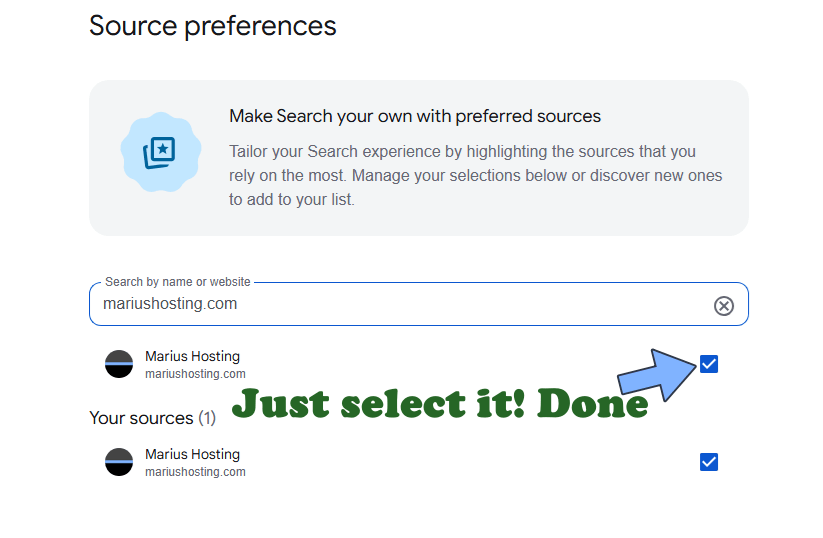
AI systems are literally stealing the content I write. Entire answers, often near word-for-word copy-paste, are served to users with zero credit to this blog. It is frustrating. If you use Google and value the work that goes into these guides, please add mariushosting to your preferred sources. It helps original content surface instead of the generated summaries.
New articles and updated Compose files are already in the pipeline. See you in the next October update. Below you will find the most recent guides updated in September 2026.
Jellyfin is a free Software Media System that puts you in control of managing and streaming your media. It is an alternative to the proprietary Emby and Plex, to provide media from a dedicated server to end-user devices via multiple apps. Jellyfin is the volunteer-built media solution that puts you in control of your media. Stream to any device from your own server, with no strings attached. There are no premium licenses or features, and no hidden agendas; just a team who wants to build something better and work together to achieve it. Note: Install Jellyfin on Your Synology NAS.
Paperless-ngx is a document management system that transforms your physical documents into a searchable online archive so you can keep, well, less paper. Note: Install Paperless-NGX on Your Synology NAS.
Immich is a very high performance self-hosted photo and video backup solution directly from your mobile phone. You can run Immich on your Synology NAS and it lets you upload photos and videos from your browser or mobile phone via the dedicated Android Immich app or the iOS Immich app. The Immich user interface feels like Google Photos, especially if you are using the mobile apps. Note: Install Immich on Your Synology NAS.
Dockhand is a modern, self-hosted Docker management platform with an intuitive web interface for homelabs, small businesses, and enterprises. It simplifies container operations, stack deployments, and observability through real-time management (start/stop/restart containers, web terminals, file transfers), a visual Compose editor, GitOps auto-sync, metrics, logs, OIDC/SSO, MFA, vulnerability scans, and multi-host support via the open-source Hawser agent. You can deploy it quickly as a Docker container with no cloud dependencies or telemetry. It’s forever free for personal use. Note: Install Dockhand on Your Synology NAS.
Portainer is a lightweight management UI which allows you to easily manage your Docker host or Swarm cluster. Portainer is meant to be as simple to deploy as it is to use. It consists of a single container that can run on any Docker engine (Docker for Linux, Docker for Synology DSM and Docker for Windows are all supported). Portainer allows you to manage your Docker stacks, containers, images, volumes, networks and more! It is compatible with the standalone Docker engine and with Docker Swarm. Note: Install Portainer on Your Synology NAS.
WordPress is a free and open-source content management system (CMS). It’s the simplest and most popular solution to create your own website or blog. WordPress makes building a website accessible to anyone, even people who aren’t developers. With WordPress you can create any type of website such as blogs, eCommerce stores, portfolio websites, forums, resumes, business websites etc. In this step by step guide I will show you how to install WordPress on your Synology NAS using Docker & Portainer. Note: Install WordPress on Your Synology NAS.
Kokoro is an open-weight TTS model with 82 million parameters. Despite its lightweight architecture, it delivers comparable quality to larger models while being significantly faster and more cost-efficient. With Apache-licensed weights, Kokoro can be deployed anywhere from production environments to personal projects. Note: Install Kokoro on Your Synology NAS.
Karakeep, previously known as Hoarder, is a self-hostable bookmark-everything app with a touch of AI for the data hoarders out there. Automatic fetching for link titles, descriptions and images. Note: Install Karakeep on Your Synology NAS.
Pixelfed is a free and open-source image sharing social network service. It is decentralized, therefore user data is not stored on a central server, unlike other platforms. The fediverse is a large network of platforms that all speak a common language. Note: Install Pixelfed on Your Synology NAS.
With Fireshare you can easily share your game clips, videos, or other media via unique links. The goal of Fireshare is to provide a very simple and easy way for you to share any videos you have through a unique link. All you have to do is put your videos in a folder and Fireshare will take care of the rest. Note: Install Fireshare on Your Synology NAS.
Nitter is a free and open source alternative Twitter front-end focused on privacy and performance. There is no JavaScript or ads. All requests go through the backend, client never talks to Twitter and it prevents Twitter from tracking your IP or JavaScript fingerprint. Note: Install Nitter on Your Synology NAS.
Formbricks is a solution for in-product micro-surveys that promises to supercharge your product experience. Formbricks provides a free and open source surveying platform. Gather feedback at every point in the user journey with beautiful in-app, website, link and email surveys. Note: Install Formbricks on Your Synology NAS.
Degoog is a modern, self-hosted search engine aggregator that lets you search multiple engines at once and view all results in a single clean, unified interface. It acts as your personal meta-search engine, forwarding queries to your chosen providers, combining the results, and delivering them without tracking or ads for full privacy. What sets it apart is its extremely powerful and flexible plugin system: you can add custom search engines, bang commands, dynamic slot plugins that insert panels based on your query, custom transports to bypass anti-bot protections, themes, aliases, user settings, and a full store for official and community extensions. It’s built as a lighter, more modular alternative to SearXNG. It is actively developed in beta, fully open source under AGPL-3.0 license. Note: Install Degoog on Your Synology NAS.
PhotoPrism is a privately hosted app for browsing, organizing, and sharing your photo collection. It makes use of the latest technologies to tag and find pictures automatically without getting in your way. Say goodbye to solutions that force you to upload your visual memories to the cloud!. Note: Install PhotoPrism on Your Synology NAS.
💡RomM
RomM is a self-hosted application for organizing and playing retro game collections through a clean, responsive web interface, ideal for emulator enthusiasts. It scans and enriches your game library with metadata from IGDB, Screenscraper, and MobyGames, supporting over 400 platforms, and fetches custom artwork from SteamGridDB. You can play games directly in the browser using EmulatorJS and RuffleRS, share your library with customizable permissions, and manage games (view, upload, update, delete) from any modern browser. RomM supports multi-disk games, DLCs, mods, patches, manuals, and custom tags for filtering. It integrates with Playnite and muOS, and displays RetroAchievements. Note: Install RomM on Your Synology NAS.
This post was updated on Thursday / October 15th, 2026 at 2:48 AM