
On November 2, 2026, UGREEN released the new UGOS PRO version 1.21.0.0190, the successor of 1.20.0.0142. Good news this time for the iDX 6011 / iDX 6011 Pro owners too: the DXP series and the iDX series get the same build, so nobody has to wait a few extra weeks. Below I will guide you step by step through the process of installing the new UGOS PRO 1.21.0.0190. The highlight of this release is security: administrators can now enforce two-factor authentication for specified users. You also get Google Drive mounting in Files, a handy Open with option in the right-click menu, the new Books app in the App Center and a quick external storage icon on the desktop. The system Kernel is now at version 6.18.15, and you can upgrade directly from 1.19.0 or later. While firmware updates on UGOS PRO have historically been non-destructive, it is always prudent to ensure important files are protected (local copies, another NAS, or cloud storage following the 3-2-1 rule).
📝UGOS PRO 1.21.0.0190 FULL CHANGELOG
⚙️Control Panel
Security / Account security: on Web/PC clients, administrators can now enforce two-factor authentication for specified users.
📁Files
1. Cloud drive mounting now supports “China Mobile Cloud Drive” and “Google Drive”.
2. Web/PC: Added “Open with” to the file right-click menu, supporting opening files with a system app and remembering your preference.
🏠App Center
“Books” is now available in App Center.
🖥️Desktop
1. Web/PC: In multi-app window scenarios, hovering over another window lets you scroll its content directly (client update required).
2. Web/PC: Added an external storage icon for quick access to open, back up, or eject external storage. Eject is admin-only (client and “Sync & Backup” update required).
📌Other Improvements
1. “Access & Authorization” added to the “Personal” page for configuring the authorization scope of external connections.
2. Web/PC: “Files”, “File Version Explorer” and “Recycle Bin” support drag-to-collapse/expand of the left sidebar (“File Version Explorer” update required).
3. “Universal Search” supports searching resources within the “Books” app.
4. Fixed the “Failed to get progress” prompt in “Task Center” when generating thumbnails.
5. Fixed some known issues to improve user experience.
STEP 1
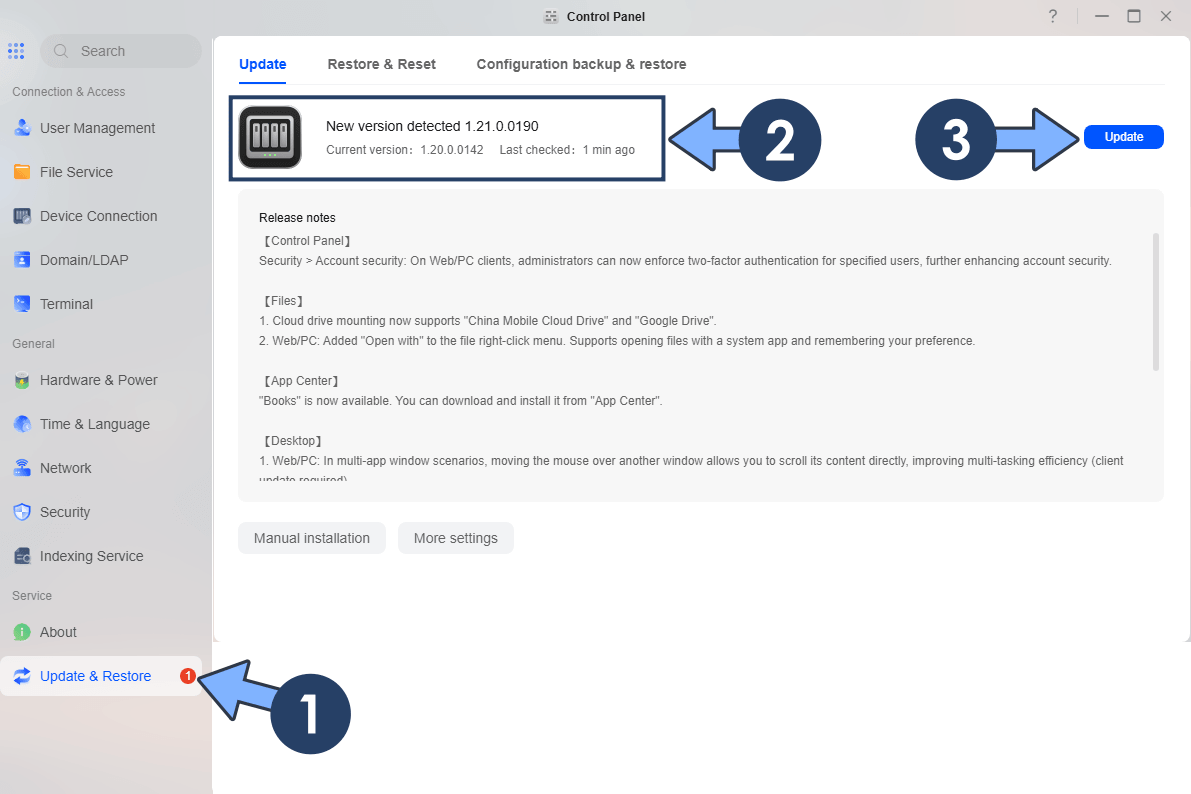
Log in to your UGREEN NAS via the web interface. Open the Control Panel. On the left sidebar, under Service, click Update & Restore. The system will automatically check for available updates. When version 1.21.0.0190 is detected, click Update.
STEP 2
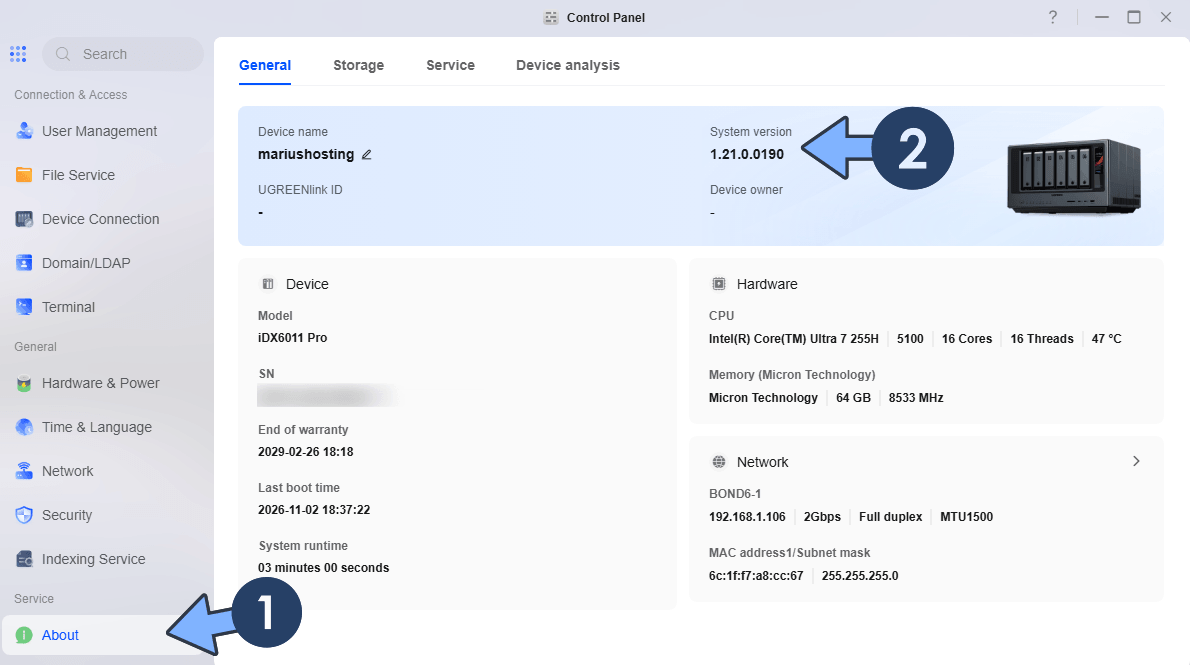
The NAS will download the package, apply the update, and restart automatically. Typically, the update will last 1 or 5 minutes depending on your UGREEN NAS model and network speed. After reboot, log in again and verify the new version under Control Panel About or Update & Restore.
Note: The feature I like most in this update is the option to enforce two-factor authentication for specific users. Until now 2FA was something each user had to switch on by themselves, and let’s be honest, many people simply never did it. Now the administrator can make it mandatory for the accounts that matter, for example family members or colleagues who access the NAS from outside your home network. One weak password is often all an attacker needs, so having this control in your hands is a real step forward for everyone who exposes their UGREEN NAS to the Internet. After the update, go to Control Panel / Security / Account security and enable it for the users you want to protect.
Note: You can also manually download the latest UGOS Firmware directly from the Official UGREEN NAS page.
Note: For the IDX series, this time the update is available right away. The iDX6011 and iDX6011 Pro receive the same 1.21.0.0190 build as the DXP models instead of a separate version number released a short time later as it happened with 1.19.10.0022. Keep in mind that the upgrade requires UGOS PRO 1.19.0 or later, so if your iDX is still on an older 1.17.x firmware, install the previous update first and then move to 1.21.0.0190.
This post was updated on Monday / November 2nd, 2026 at 6:51 PM