

Privacy-conscious users love self-hosting on a UGREEN NAS, but nobody likes unnecessary telemetry sending data back to the manufacturer. In this quick guide I’ll show you exactly how to disable telemetry on your UGREEN NAS (also called the “Device Analysis Improvement Program” or “User Experience Program”). It takes less than 30 seconds and has zero impact on performance or features.
UGREEN’s “Device Analysis Improvement Program” collects: Account ID & device ID, IP address, network info, performance metrics, page visits, click behavior, feature usage statistics, crash diagnostics and more. The data is used “to analyze product usage patterns, enhance product stability, and develop new features”. Participation is completely optional and you can opt out at any time. If you value privacy on your home lab, just like we do with any other NAS, turn it off.
STEP 1
Please Support My work by Making a Donation.
STEP 2
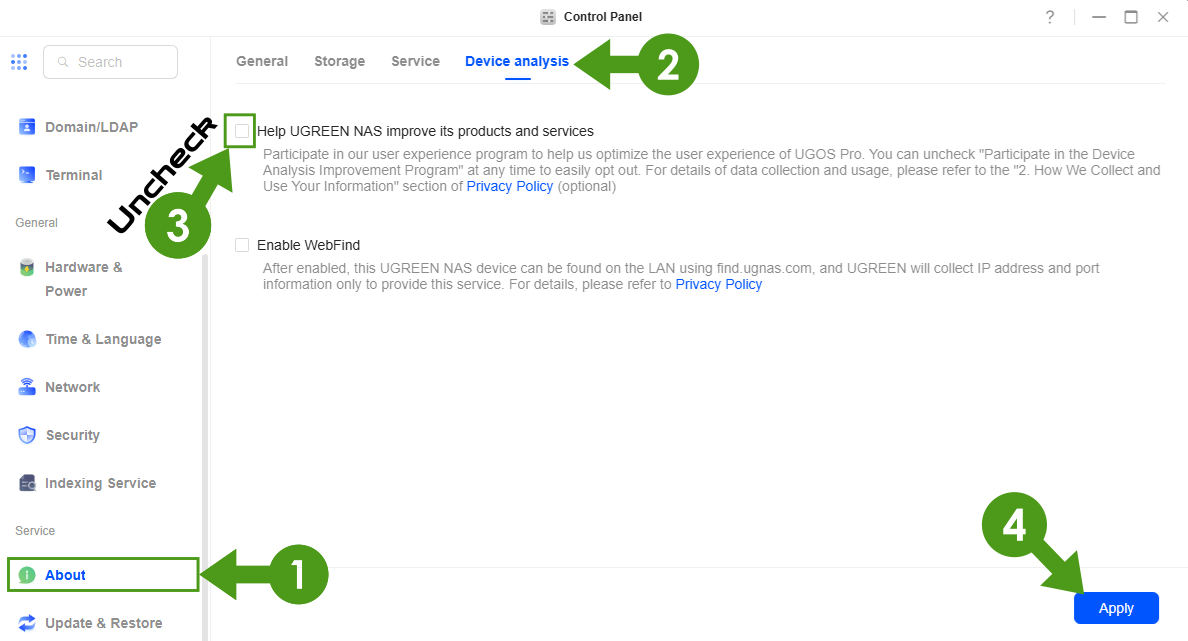
Log into your UGREEN NAS Control Panel (the web interface). On the left sidebar, scroll down to the Service section and click About. At the top of the page, click on the Device analysis tab. You will see two options:
- Help UGREEN NAS improve its products and services – This is the telemetry checkbox.
- Enable WebFind – Separate discovery service (leave it as you prefer).
Uncheck the box Help UGREEN NAS improve its products and services. Click the Apply button at the bottom right to save the settings. That’s it! Telemetry is now disabled. Follow the instructions in the image below.
Your UGREEN NAS device no longer participates in the Device Analysis Improvement Program. No more data is sent to UGREEN for product analytics.
What about WebFind? The second checkbox (Enable WebFind) is not telemetry. It only allows your NAS to be discovered on the local network via find.ugnas.com and shares minimal IP/port information for that purpose only. Most users leave it disabled too for extra privacy.
This post was updated on Saturday / March 7th, 2026 at 12:37 AM