

SvelteKit generates large Link headers, causing a 502 error with Nginx. Some Docker containers such as Wishlist, AdventureLog and Nahpet do not work well with Reverse Proxy due to a SvelteKit issue. Many users running various self-hosted applications through Synology’s built-in reverse proxy encounter the infamous 413 Request Entity Too Large error with a Blank Synology page. This happens because the default Nginx configuration on DSM has very small buffer sizes for proxied requests. Here is a proven, minimal and relatively safe way to fix it (still working in DSM 7.1 / 7.2 / 7.3).

STEP 1
🟢Please Support My work by Making a Donation. Almost 99,9% of the people that install something using my guides forget to support my work, or just ignore STEP 1. I’ve been very honest about this aspect of my work since the beginning: I don’t run any ADS, I don’t require subscriptions, paid or otherwise, I don’t collect IPs, emails, and I don’t have any referral links from Amazon or other merchants. I also don’t have any POP-UPs or COOKIES. I have repeatedly been told over the years how much I have contributed to the community. It’s something I love doing and have been honest about my passion since the beginning. But I also Need The Community to Support me Back to be able to continue doing this work.
STEP 2
STEP 3
Make a backup of the original nginx.mustache file (very important!).
In the SSH window, type in the following:
sudo cp /usr/syno/share/nginx/nginx.mustache /usr/syno/share/nginx/nginx.mustache.bak-$(date +%Y%m%d-%H%M)
STEP 4
In the SSH window, type in the following:
sudo vi /usr/syno/share/nginx/nginx.mustache
Press / then type error_log and press Enter on your keyboard to jump to the error_log line.
Move the cursor right after the line that looks similar to:
texterror_log syslog:server=unix:/dev/log,facility=local4|error level=error;
Press i to enter insert mode.
Press Enter on your keyboard to create some new lines.
Paste/insert these three lines:
proxy_buffer_size 128k;
proxy_buffers 4 256k;
proxy_busy_buffers_size 256k;
STEP 1
Please Support My work by Making a Donation.
STEP 2
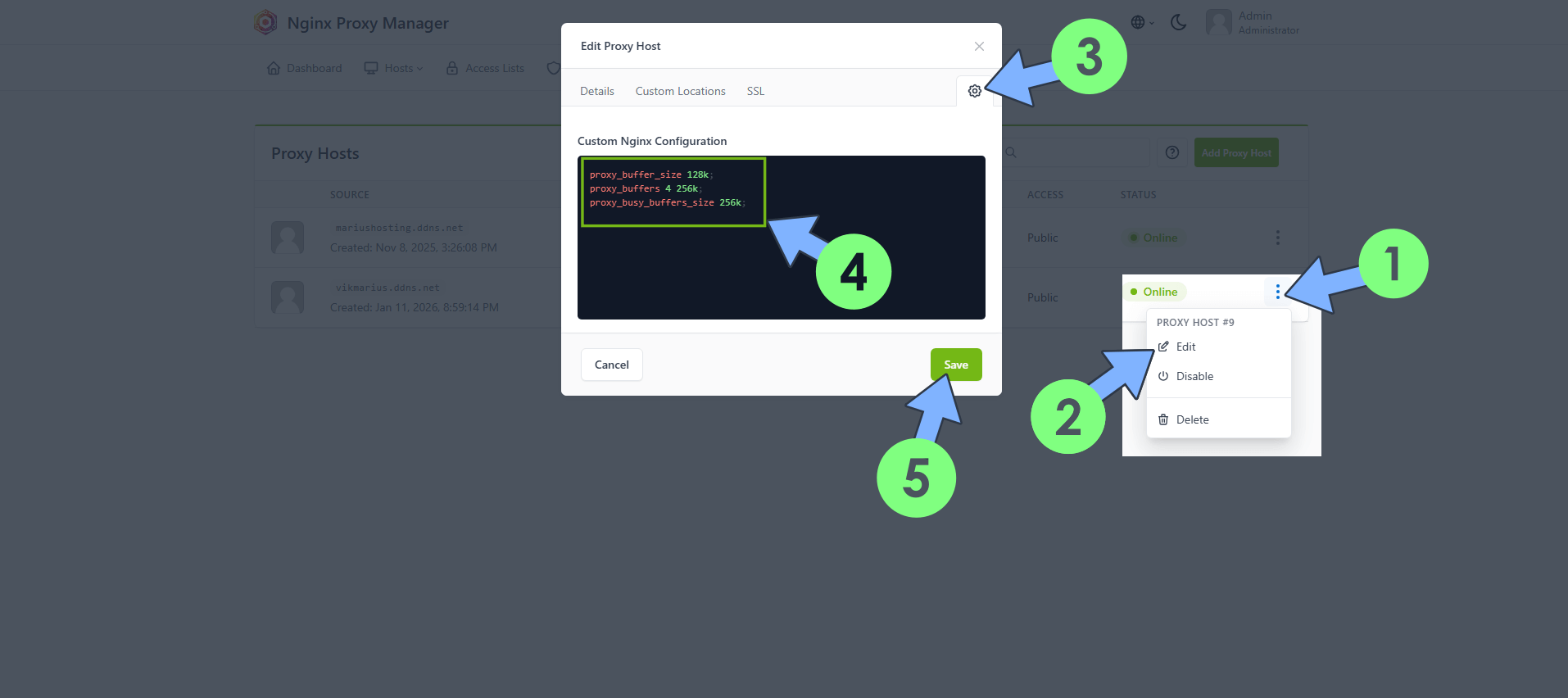
Identify your Reverse Proxy that is experiencing the buffer size issue. Click on the 3 vertical dots. Click Edit. Click the Settings icon. Paste the following Custom Nginx Configuration.
proxy_buffer_size 128k;
proxy_buffers 4 256k;
proxy_busy_buffers_size 256k;
Click Save. Follow the instructions in the image below.
This post was updated on Sunday / January 18th, 2026 at 11:06 PM